Chat-based AI video generator. Describe a video in chat and create it with leading models.
What is viewmax studio?
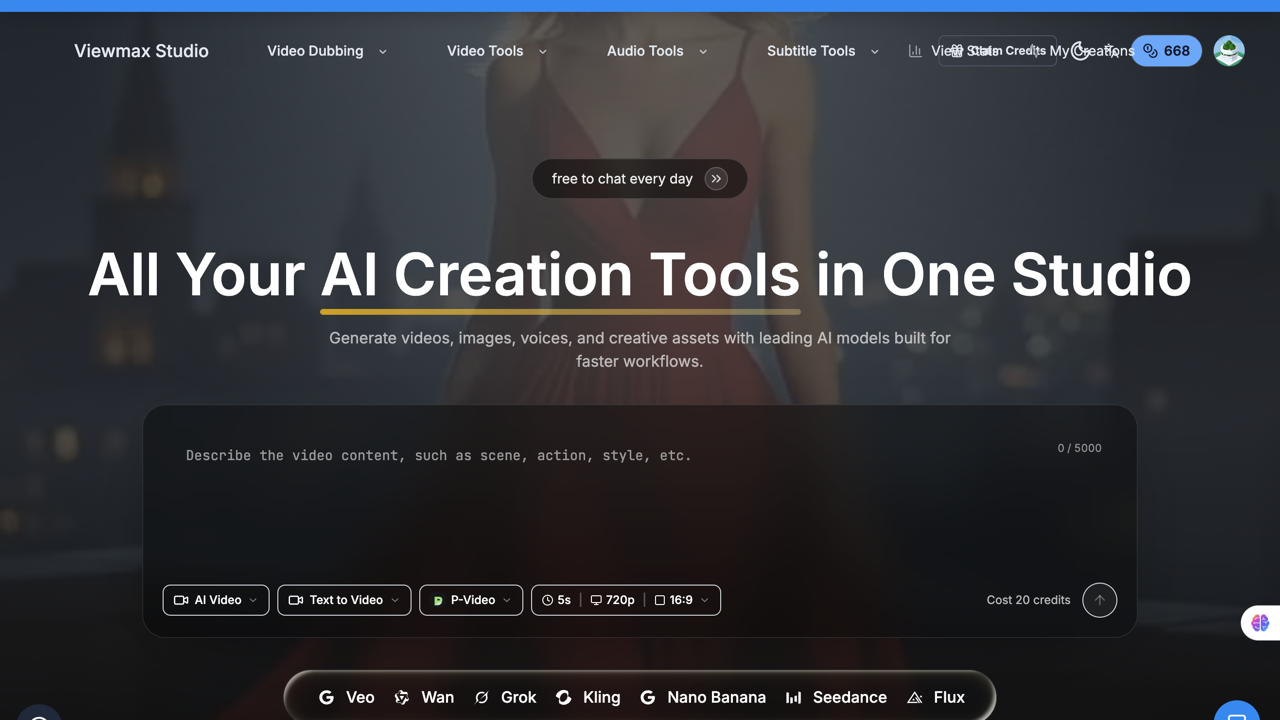
ViewMax Studio is a web-based AI creation studio for generating video, images, voice, music and sound effects with third-party models and ViewMax's own C1 and Turbo video models. Its AI Video page lets users chat with the Viewmax Agent to turn one idea into a long video, @mention reference materials, edit any shot with a one-sentence instruction and keep characters consistent, while a No Agent mode gives manual control over every shot. The publisher says it is built for marketers and creators, from influencers to product teams, naming content creators, product marketers, artists and animators.
The studio also offers text-to-video and image-to-video generation with models such as Seedance, Veo, Kling, MiniMax, Grok Imagine and ViewMax C1, plus an AI Canvas where reference assets, images, videos and storyboards are connected as nodes and planned, generated and reviewed with the Agent. A Super Studio section covers motion graphics, music videos, explainer videos, story videos, hand-drawn stories, faceless channels and AI podcasts, and separate tools handle auto captions, subtitle translation, text to speech, video upscaling and vocal separation. For developers, ViewMax provides a REST API with an OpenAPI specification and an MCP server for Claude, Cursor, Codex and other MCP clients, both drawing on the same credit balance as the web app.
A viewmax CLI for video tasks is documented but not yet published to npm. ViewMax Studio is free to start, with credits on signup and no credit card required. Monthly plans are Starter ($19, 1,000 credits), Lite ($29, 2,000 credits), Pro ($59, 4,500 credits) and Ultra ($99, 9,000 credits).
Annual plans cost $129 (Lite), $249 (Pro) and $399 (Ultra) per year, one-time credit packs start at 2,000 credits for $39, and a Business tier is available through sales. Paid plans list no-watermark outputs and a commercial license, and credits for failed generations are refunded automatically.
Pricing: Free signup credits; Starter $19/mo, Lite $29/mo, Pro $59/mo, Ultra $99/mo; annual Lite $129, Pro $249, Ultra $399; credit packs from $39 (2,000 credits); Business via sales
Features
- Chat with the Viewmax Agent to turn one idea into a long video and edit any shot with one sentence
- Text-to-video and image-to-video with models including Seedance, Veo, Kling, MiniMax and ViewMax C1
- AI Canvas that connects reference assets, storyboards and generation nodes, planned with the Agent
- Image, text-to-speech, music and sound effect generation on one shared credit balance
- Super Studio formats for explainers, story videos, faceless channels, podcasts and motion graphics
- Tools for auto captions, subtitle translation, video upscaling and vocal separation
- REST API, OpenAPI spec and MCP server for generating media from scripts and AI agents
- Paid plans list no-watermark outputs, a commercial license and automatic refunds for failed generations
FAQs
Common questions about viewmax studio
Is ViewMax Studio free?
How does the chat-based video creation work?
Which AI models are available?
Can ViewMax be used from code or AI agents?
Can generated videos be used commercially?
Who makes ViewMax Studio?
Insights
Traffic and momentum for viewmax studio
What are alternatives to viewmax studio?
6 similar tools

Genviral
Genviral is an agentic social media platform that brings content creation, scheduling, publishing, and performance analysis into one workspace.
wan ai video
Wan AI - AI Video Generator | Text to Video | Image to Video | Voiceover Creation Wan AI Video Generator for Text to Video, Image to Video, and Voiceover Creation Create cinematic AI videos from a text prompt or image. Start with 2 free standard-quality previews, then upgrade for HD output, longer videos, and advanced creative controls.

Ray32.net
An independent browser service for generating video from prompts or images, using signup credits and one-time credit packs.

TinyFish
Web APIs for AI agents to search live results, fetch clean page content, run browser sessions, and automate workflows.

X
The real-time everything app — posts, news, and conversation, plus the X API and a hosted MCP server for connecting AI agents to real-time data.
Zaro
An AI workspace that lets you build context-aware agents, apps, and workflows on top of your own company data — from a single prompt.
Ask AI about viewmax studio
Share
Similar Launches
Genviral
Genviral is an agentic social media platform that brings content creation, scheduling, publishing, and performance analysis into one workspace.
wan ai video
Wan AI - AI Video Generator | Text to Video | Image to Video | Voiceover Creation Wan AI Video Generator for Text to Video, Image to Video, and Voiceover Creation Create cinematic AI videos from a text prompt or image. Start with 2 free standard-quality previews, then upgrade for HD output, longer videos, and advanced creative controls.
Ray32.net
An independent browser service for generating video from prompts or images, using signup credits and one-time credit packs.
TinyFish
Web APIs for AI agents to search live results, fetch clean page content, run browser sessions, and automate workflows.
X
The real-time everything app — posts, news, and conversation, plus the X API and a hosted MCP server for connecting AI agents to real-time data.
Zaro
An AI workspace that lets you build context-aware agents, apps, and workflows on top of your own company data — from a single prompt.
Comments