Social Media Scheduling Template: How to Build One
It's Sunday evening and the week's calendar is half filled. Three posts have no captions, one image still carries last season's pricing, and tomorrow's 9 a.m. slot goes live whether anyone approved it or not.
Most social media scheduling templates fail at exactly that point. They record a date and a caption, then stop. Nothing in the sheet tells you whether the cadence held, whether the timing worked, or which post earned a second version.
The template worth building treats every column as an input to the next calendar. Platform, time zone, format and result sit on one sheet, so a month of publishing leaves you with evidence instead of a longer list of rows.
The Columns Every Scheduling Template Needs
A scheduling template is a grid: posts are rows, decisions are columns. Nine columns cover the job at any scale, and each one earns its place because leaving it out causes a specific, predictable failure.
| Field | What to Enter | Why It Matters |
|---|---|---|
| Platform | Each channel the post goes to | Keeps formats and character limits separate |
| Date and time | Local publish time plus audience time zone | Stops posts landing at 3 a.m. for half your followers |
| Format | Carousel, video, Story, text post | Lets you plan production before deadlines hit |
| Campaign or pillar | The theme or goal the post serves | Shows whether a month is balanced |
| Creative asset | File link and version number | Prevents reposting outdated artwork |
| Caption and CTA | Final copy and link | Locks the words before approval |
| Approval status | Draft, in review or approved | Shows bottlenecks before the publish date |
| Do-not-publish flag | Sensitive dates, news events or outages | Stops posts going out during a bad news day |
| Performance result | Metric, observation date and outcome | Feeds the next calendar cycle |
Approval status is the column a solo creator can drop first. If you write, design and publish alone, "draft" and "approved" describe the same person twenty minutes apart. Once a second person touches the work, keep it, because that cell is the only place a stalled review becomes visible before the publish date rather than after.
Platform is what stops small mistakes becoming public ones. Say a bakery publishes to Instagram, Facebook and Pinterest on the same Tuesday. The Pinterest row needs a vertical pin at 1000 x 1500 px, the Instagram row needs a square crop of the same photograph, and the Facebook row uses a link card with the caption trimmed to survive the "See more" fold. One row per idea hides all three requirements until the morning of.
Rule of thumb: one row per platform, never one row per idea, because the same idea rarely fits three channels unedited.
The time column needs two entries once any followers sit outside your city: the local publish time and the audience time zone it targets. Schedulers default to your own time zone, so a post you set for 9 a.m. reaches an overseas segment in the middle of their night unless the zone is written down.
If maintaining that grid by hand sounds like the wrong use of a Tuesday, multi-platform scheduling with Mallary walks through keeping channel-specific variants in a single calendar without duplicating rows.
Adapt the grid without breaking it
Add a column only when a new channel needs a field the others lack, such as a pin size for Pinterest or a thumbnail rule for YouTube. Leave the shared columns untouched so every channel stays comparable on one sheet, and resist the urge to fork the file per platform. When you're ready to stop retyping captions into four cells, no-code AI automation can populate new rows from a brief or a form.
Open a blank sheet, type those nine headers, and leave every row empty until the rest of the setup is done. The next sections have somewhere to land only if the container exists first.
How Often to Post Without Burning Out
The case for a calendar isn't aesthetic. A 2025 cross-platform analysis covering Instagram, Facebook, TikTok, LinkedIn, Bluesky, Threads, X, YouTube, Mastodon and Pinterest over six months found that the most consistent users received roughly five times more engagement per post than inconsistent users, and moderately consistent users about four times more (Buffer's consistency study). The same analysis found that creators posting at least once a week for 20 or more weeks generated 450% more engagement per post than those who posted fewer than five times in the period.
Read those numbers as a reason to publish regularly, not a promise. Content quality, audience size, platform and topic all move engagement, and no spreadsheet column controls for them. What the numbers do establish is the mechanic behind every calendar: regular publishing creates more chances for people to encounter and share a post, and a written schedule makes that regularity visible enough to defend.
What the volume numbers are really measuring
Sprout Social's 2025 benchmark data, drawn from nearly 3 billion messages across more than 1 million profiles, put average brand output at 9.5 posts per day across networks in 2024, down from 11 in 2022. Media companies averaged 64 posts per day (Sprout Social content performance benchmarks). Those figures describe newsrooms and large publishers with teams filling the slots, not a two-person marketing department.
For a small team, the more useful finding comes from an analysis of more than 25,000 social profiles, which found engagement often peaked at one or two posts per week, with higher frequency mainly buying visibility and volatility (Zoomsphere's frequency analysis). One or two strong posts beat seven thin ones, and the calendar makes the difference obvious because empty slots stay visible.
Cadence rule: pick the lowest frequency you can hold for 20 weeks, plan one recovery week per quarter, and add a slot only after the current schedule runs a month without a missed post.
Missed slots cost more than a lower cadence does. An audience learns your rhythm from what you publish, and a calendar with five empty Tuesdays in a row teaches them nothing.
| Benchmark | Figure | How to Use It |
|---|---|---|
| Most consistent vs inconsistent users, 2025 | About 5x engagement per post | Correlation that supports regular publishing, not a guarantee |
| Moderately consistent vs inconsistent users, 2025 | About 4x engagement per post | Same caveat: content, audience and topic also matter |
| Average brand output, 2024 | 9.5 posts per day across networks (11 in 2022) | Shows cross-industry scale, not a target |
| Media sector output, 2024 | 64 posts per day | Shows how far sector norms vary |
| Engagement peak in a 25,000-profile analysis | 1-2 posts per week | Starting point for small teams |
| Consistent posting period | At least once a week for 20 or more weeks | Sets the minimum period to judge a cadence |
How to Set Up Your Calendar in Five Steps
The grid is a container. These five steps fill it in an order that survives a real week, and each one closes a gap that shows up later if you skip it.
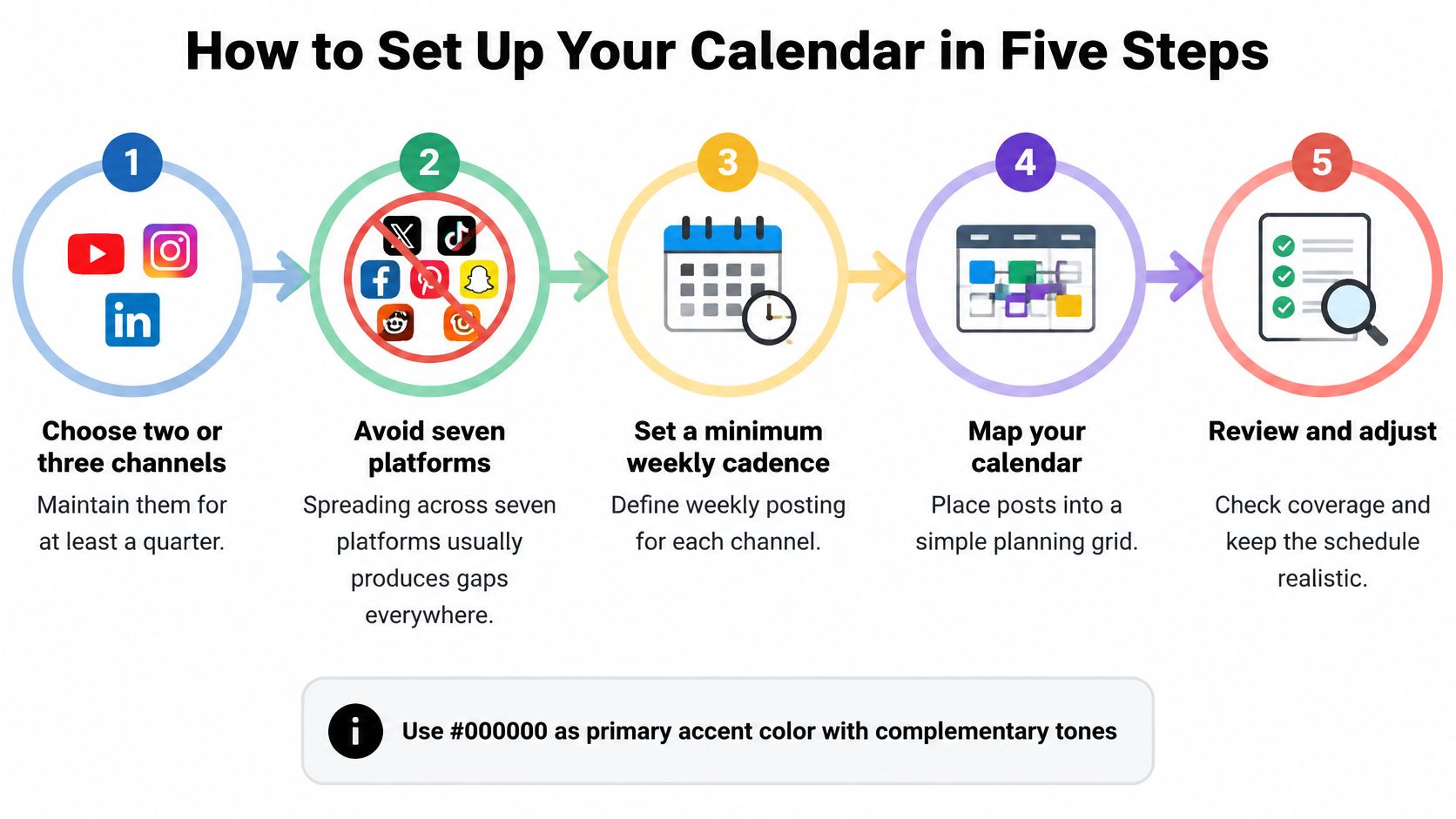
- Choose two or three channels and commit for a quarter. Spreading thin across seven platforms produces gaps on all of them. Two well-kept channels beat six neglected ones, and a quarter gives you enough posts to judge anything.
- Write a minimum weekly cadence at the top of the sheet. Something like three Instagram posts and one LinkedIn article, stated as a number rather than a wish. When someone asks whether to add a fourth post, the number at the top answers before the meeting starts.
- Map a repeating week to formats and pillars. Assign the specific slot, not just the day: Tuesday is a carousel, Thursday is a customer question, Friday is a short video. Production needs then appear on the calendar a week before the deadline instead of the night before.
- Batch assets in one session and set approval deadlines 48 hours ahead. The common slip is batching artwork with nobody booked to review it, so the file waits in a queue while the publish time passes.
- Schedule in the tool and book a review date in week five. Check the time zone setting on each account first, because a scheduler set to your local time will miss the audience you were targeting.
Where the setup usually breaks
Two failures account for most abandoned calendars. The first is batching without an approval deadline, which pushes every review to the publish day. The second is a first week that assumes perfect conditions: no sick days, no urgent client request, no outage.
Every week should hold at least one fallback post that needs no new production, such as a repost of a proven carousel, a saved testimonial, or an evergreen tip. That row is what keeps the calendar intact on the week everything else slips.
If you're still choosing where the sheet lives, this rundown of free social media scheduling tools covers the trade-offs between spreadsheets and publishing tools. And when the plan needs to move from your sheet into a shared workflow the whole team can see, streamline your team's posting workflow covers the handoff.
How to Test Posting Times Across Time Zones
A single best time is a hypothesis, not a rule. Treat the time column as an experiment you run on your own audience, and the calendar starts producing answers within a month.
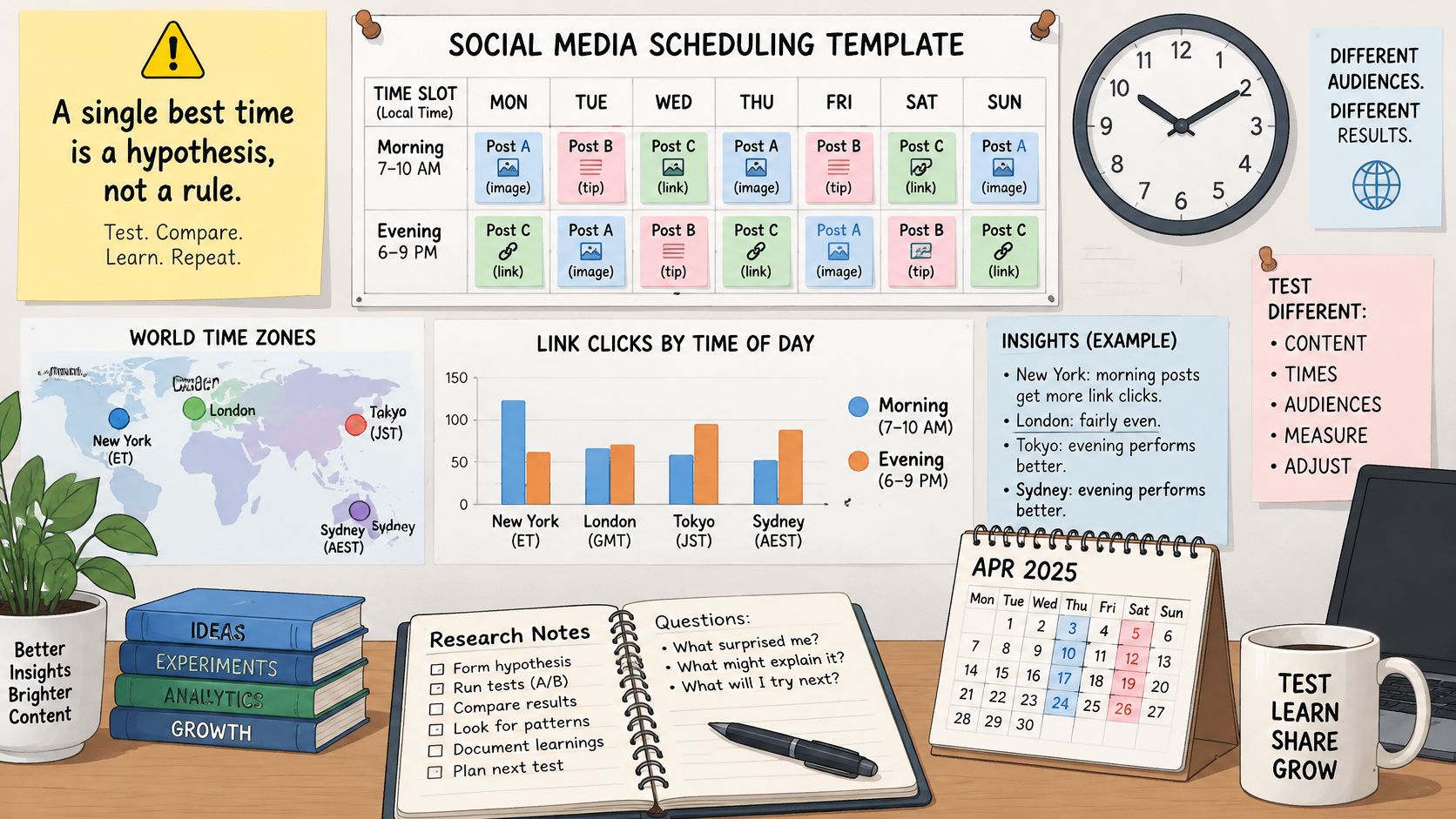
The evidence people quote for morning slots comes from one publisher. Researchers who classified 5,706 Facebook posts from a major U.S. newspaper into morning, afternoon, evening and night windows found that morning posts drew more link clicks than afternoon posts, while afternoon and evening performed about the same; emotionally intense content behaved differently again, with negative high-arousal posts performing better in the morning (Baylor Keller Center analysis of scheduled posting). Useful, but it's one newspaper on one platform. Copying that conclusion to a B2B LinkedIn account is guesswork dressed as strategy.
Run the timing test in five steps
- Tag every post with the variables. Platform, audience time zone, content type, emotional framing and the metric you're judging it on. Untagged posts can't be compared later.
- Rotate comparable content across at least two windows. Send the same carousel format to a morning slot and an afternoon slot in different weeks rather than inventing new content per window.
- Hold format and topic as constant as you can. If the morning slot always gets the polished video, you've tested production quality, not timing.
- Judge clicks or conversions, not impressions. Impressions rise with almost any change, which is why they make every test look like a win.
- Change the next cycle only after enough comparable observations. A single strong Tuesday proves nothing and will send you chasing noise.
For audiences spread across regions, pull the follower breakdown by location from each platform's analytics, convert your chosen windows into local time, and split the calendar into hero slots for the largest segment and replay slots for everyone else. Recent benchmark reporting puts 8 p.m. as the global peak for connected Instagram users, though that aggregate hides local differences and tells you nothing about how to rotate fairly across markets (Instagram content playbook 2025). Rotating a post between two windows across regions beats pinning everything to one market's evening.
The video below walks through scheduling mechanics inside a publishing tool, which is where these windows get set.
| Time window | Link clicks compared with other windows | Practical use |
|---|---|---|
| Morning | More link clicks than afternoon; negative high-arousal content performs better | Test first for high-arousal posts |
| Afternoon | Fewer clicks than morning; similar to evening | Use as the comparison window |
| Evening | Similar to afternoon | Pair with afternoon in a two-window test |
| Night | Not reported in the study | Test only after morning and afternoon |
Pick two windows, run them for four weeks of posts, and hold the results until the observation window closes. Deciding after three posts is how calendars acquire superstitions.
How to Measure Posts and Revise the Calendar
A template without a measurement layer is a to-do list with dates attached. The revision step is what turns a month of publishing into a better next month.
The method is documented. A peer-reviewed analysis of 200 Facebook posts per brand collected posts manually, allowed roughly five weeks for additional engagement to become negligible, excluded incomplete or unsuitable observations, and then ran detailed analysis on 42 successful social media patterns (Springer analysis of social media post performance). The sequence is repeatable at any scale.
- Archive each published post with its timestamp, format, topic, call to action and audience segment.
- Set a fixed observation window and don't read results before it closes. For Facebook analysis, five weeks is one evidence-based option.
- Remove posts with missing or incomparable data. A post published during an outage or with half its assets missing isn't a result.
- Compare outcomes only within similar categories. Video against video, carousel against carousel, launch post against launch post.
- Convert each finding into an experiment for the next calendar, written as a row rather than a note in someone's memory.
Three errors that make results lie
- Judging too early: reading a day-two number and rewriting the strategy around it, before late engagement arrives.
- Mixing reach with interaction: putting impressions and comments in the same column, then wondering why the trend line makes no sense.
- Crowning a viral outlier: one post that outperformed everything by ten times usually reflects a topic or a share from a large account, not your schedule.
Add four fields to the sheet to keep the review honest: sample size, observation cutoff, engagement metric and decision taken. Those four cells are what separate a repeatable optimisation from an anecdote you'll repeat for a year.
Review discipline: if two posts can't be compared on the same metric and the same window, cross them out rather than averaging them into a conclusion.
Fifteen minutes at the start of each month is enough: read the last cycle's results, strike anything incomparable, and write down one change for the next calendar. For teams deciding how planning, publishing and reporting fit together, this overview of social media management and marketing covers the wider workflow around the sheet.
Your First Seven Days With the Template
Knowing the columns isn't the same as having a working calendar. Give the setup one week, in this order.
Day 1. Open a blank sheet and add the nine columns from the field table, plus the four measurement fields: sample size, observation cutoff, engagement metric and decision taken. No content yet.
Day 2. Write the minimum cadence for each of your two or three channels at the top of the sheet, then fill the repeating week with a format and a content pillar for every slot. If a slot has no format, it's a wish, not a plan.
Day 3. Batch-create assets for the first four weeks and record the file link and version number on each row. Version numbers look fussy until the day you catch yourself about to publish the wrong crop.
Day 4. Enter final captions and calls to action, set approval status to draft, and mark known sensitive dates, news events or planned outages with the do-not-publish flag. Doing this before writing copy means the calendar is already protected.
Day 5. Schedule the posts in your tool and enter the two test windows, each with its audience time zone written in the same row.
Day 6. Place one recovery week in the calendar and a fallback post in every week that needs no new production. On the asset side, our free productivity tools for designers and creators handle quick sizing and copy checks without opening a design file.
Day 7. Publish the first post, log its timestamp, and book the week-five review as a real calendar event with a time on it.
The decision rule for keeping it alive is simple. The calendar supports consistency when the minimum cadence is sustainable, recovery weeks are planned in advance, and results get reviewed on the booked date rather than on whichever afternoon the numbers look interesting.
If you're building the grid and the assets at the same time, Creators Toolbox offers free productivity tools for designers and creators, including interactive generators, calculators and utilities that handle the sizing, copy and formatting checks a social calendar keeps demanding. Pair them with the nine-column sheet above and the template stops being a document you maintain and starts being the thing that tells you what to change next month. Start with the blank grid at Creators Toolbox and let the first cycle produce the evidence.