Social Media Management and Marketing: A Complete Guide
You're posting when you remember, replying when you notice, and checking likes at the end of the week to guess whether any of it worked. That's how most small businesses start with social media management and marketing, and it's exactly why the effort feels busy but doesn't move enquiries or sales. A calmer approach treats social media as a measurable operation, with a small number of decisions you can check each month.
The Four Stages of Social Media Management and Marketing
Say a bakery owner photographs today's loaves whenever she remembers, between serving customers and cleaning trays. Some weeks she posts five times, other weeks not at all, and she can't tell whether Instagram brings anyone through the door. Nothing moves because she has publishing without the stages around it.
Management means running the accounts day to day. That's scheduling posts, replying to comments, and keeping profiles accurate. Marketing means using those accounts for a specific result, such as enquiries, sales, or sign-ups. You need both, because a smart campaign fails if nobody answers the messages it creates.
A Newsroom Analogy That Makes the Loop Clear
Think of a small newsroom. Planning is the editorial meeting that decides what matters and who it's for. Publishing is the press run that gets the story out on time. Engagement is the letters page, where readers respond and expect an answer. Measurement is the circulation report that shows what people read.
The infographic below maps that loop from simple posting toward growth.
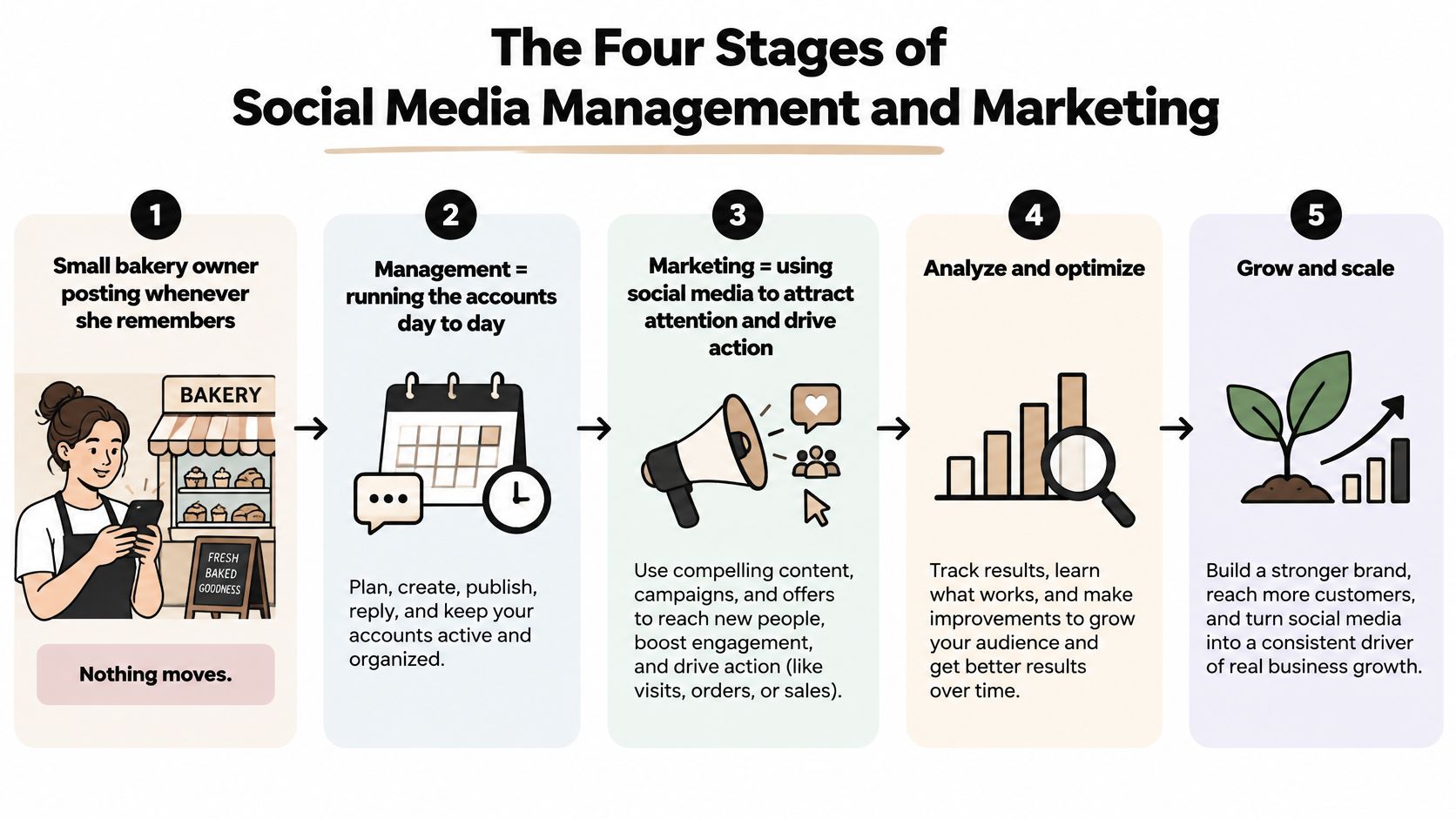
The stages form a loop, not a line. What measurement tells you this month becomes the starting point for next month's planning, so each round is a little less guesswork than the last.
| Stage | Core question | Typical outputs | Key metric |
|---|---|---|---|
| Planning | What are we trying to achieve and for whom? | Goals, audience profiles, content pillars, content calendar | Goal progress and audience fit |
| Publishing | What goes out, where and when? | Scheduled posts, stories, short videos, approved captions | Posting consistency and on-time delivery |
| Engagement | How do we respond to people who reply, message or complain? | Replies, moderated comments, escalated messages | First response time and resolution rate |
| Measurement | Did it work, and what should change next? | Monthly report, keep, stop or scale decisions | Qualified clicks, conversions and retention |
Practical rule: If you can't name the key metric for a stage, you're probably doing the activity without learning from it.
Your first task is simple. Look at your last month and decide which stage is weakest. Most beginners discover they publish often, plan rarely, and measure almost never.
Choosing Platforms and Posting Rhythm When Time Is Short
You're told to be everywhere your customers might scroll. For a small team, that advice guarantees thin, rushed content on five platforms instead of useful content on one.
The time problem is well documented. An eMarketer report on small businesses struggling to keep up with social media found that 56% of small-business leaders struggle to prioritize social media, while 54% struggle to produce enough content for multiple channels. If that sounds familiar, the answer isn't more hustle. It's fewer, better chosen channels.
Five Questions That Beat Follower Counts
Choose platforms using decision rules you can answer. Where does your audience already spend time, and where are they when they're close to buying? Which format can you produce well, a photo, a short video, or a written post? How much production effort does each post take, and can you trace a result, such as an enquiry or a booking, back to it?
- Audience location: Pick where buyers already are, not where competitors look busy.
- Purchase journey: A platform used for entertainment may build awareness but rarely closes a sale.
- Production effort: A format you dread making won't survive a busy month.
- Measurable outcome: Prefer channels where clicks and enquiries are easy to track.
| Platform | Best for | Format that works | Realistic cadence |
|---|---|---|---|
| Visual brands, lifestyle and product discovery | Reels, carousels, Stories | 3-4 posts a week | |
| B2B services, professional audiences, hiring | Text posts, documents, short native video | 2-3 posts a week | |
| TikTok | Discovery and entertaining short video | Short vertical video with trending audio | 3 videos a week, batched |
| Local businesses, communities and events | Photos, links, event posts, group updates | 2-3 posts a week | |
| Ideas-led shopping, home, food and DIY | Vertical pins linked to product or blog pages | 5-10 pins a week |
A narrow, repeatable system usually beats an unrealistic schedule. Two solid posts a week on one platform, answered promptly and reviewed monthly, will teach you more than daily posts you abandon by March. If scheduling by hand is what's eating your hours, this roundup of free social media scheduling tools can help you batch the work instead.
Give a platform roughly eight to twelve weeks of steady, on-pillar posting before you judge it.
That patience matters because low early reach alone doesn't prove a platform is wrong for you. It may just mean the test was too short or too scattered to learn anything. Judge the channel on enquiries and qualified clicks over that window, not on one quiet Tuesday.
How to Build a Content Calendar in Six Steps
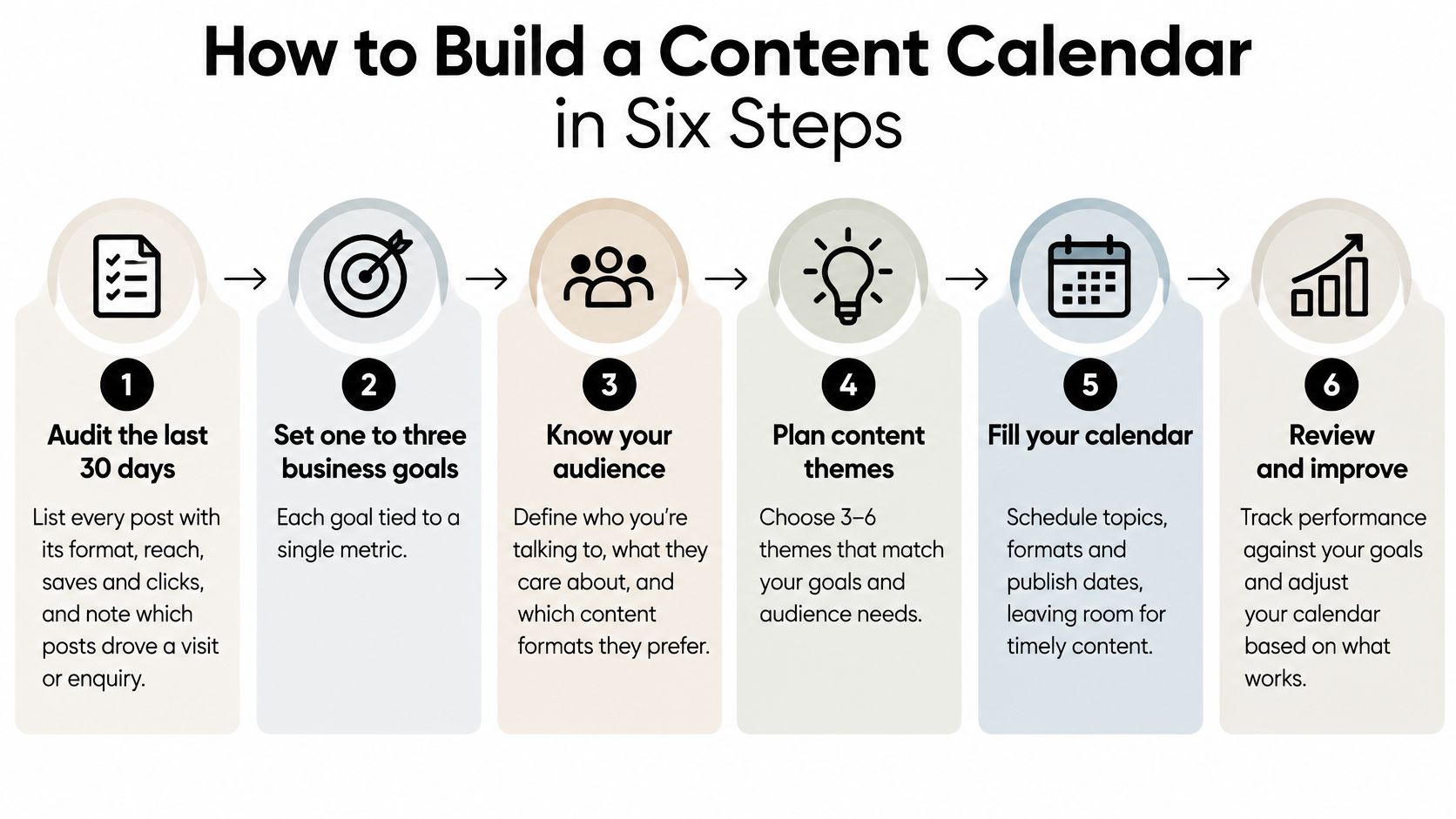
A content calendar isn't a pretty grid. It's a promise about what you'll publish, why it exists, and how you'll know it worked. The six steps below build one that a small team can keep.
The visual below shows the sequence at a glance before you work through it.
Steps One to Three Set the Direction
1. Audit the last 30 days. List every post with its format, reach, saves, and clicks, and mark which ones drove a visit or enquiry. The common slip is skipping this and guessing, which means you repeat weak formats because they felt fun to make.
2. Set one to three business goals. Tie each goal to a single metric, such as enquiries per month or pre-orders per week. If a goal has five metrics attached, you'll always find one that looks good and learn nothing.
3. Pick platforms by audience, not habit. Stay where your buyers already spend time, even if that means pausing an account you've had for years. An old account with no buyers on it is a cost, not an asset.
Steps Four to Six Make It Repeatable
4. Define three to five content pillars. Typical pillars are product, behind the scenes, customer stories, how-to tips, and offers. Every post should belong to one pillar, and here's the trap to avoid. If your pillars are so broad that any post fits anywhere, they aren't guiding anything.
5. Set a cadence you can keep and batch-produce. Take one core idea, such as a new product launch, and adapt it per platform. It might become a Reel showing it in use, a carousel answering common questions, and a short text post with a customer quote. Batching two weeks of content in one session protects you from daily scrambling.
6. Schedule, then review monthly. Load the posts into your scheduler, check captions and links once, and let them run. If you're weighing up tools for this stage, the comparison of Taja AI versus Sprout Social is a useful way to see how scheduling and content features differ before you commit. At month end, compare results against your goals and adjust the next calendar.
- Every post has a job: It maps to one pillar and one goal.
- No week is empty: Gaps are planned breaks, not accidents.
- Formats repeat on purpose: Winning formats return because they earned it.
That's what a healthy calendar looks like. You can open it on a Monday and know exactly what goes out, why it's going out, and what you'll check later.
Engagement Workflows That Protect Response Quality
Engagement isn't a friendly extra after publishing. It's a service operation, and it carries a bias teams don't notice.
A University of Pittsburgh study of complaints directed at seven major U.S. airlines modelled both whether a complaint received a response and how quickly it arrived. It found that customer influence, particularly follower count, and the presence of bystanders affected response behavior. In plain terms, visible people got answered faster, which means quieter customers can be left waiting without anyone deciding that on purpose.
Build the Queue Before You Need It
Start with a unified inbox, so comments and messages from every platform land in one queue instead of three apps. Add sentiment and influence scoring to flag angry or high-risk messages early, but use the score to find urgency, not to decide who deserves help.
Then write escalation rules in advance. Refund requests go to whoever can approve refunds. Safety or allergy questions go to the owner. Legal threats go to one named person and nobody improvises a public reply. If you're setting this up for the first time, these social media support best practices walk through the service side in more detail.
- Unified inbox: One queue, one owner per shift, nothing lost between apps.
- Scoring: Flags urgency and tone so risky messages surface first.
- Escalation rules: Route refunds, safety, and legal issues to named people.
- Service-level targets: One response-time promise that applies to every customer.
Automation can help with routine questions about hours or delivery, and this guide to the best customer service chatbots compares options if volume is growing. Keep a human path visible, though, because a bot that loops frustrates people faster than a slow reply does.
Track Four Measures Separately
Your dashboard should show response probability, median time to first response, resolution time, and performance by issue type as separate numbers. Kept apart, they reveal a pattern a single average hides. Automation might raise the share of messages answered while complex complaints sit unresolved for days.
"Answered" is not the same as "resolved." A fast first reply that goes nowhere still leaves an unhappy customer.
This week, do three things. Set up the unified inbox, write three escalation rules, and choose one response-time target you'll report every Friday.
Measuring Results Beyond Engagement Rate
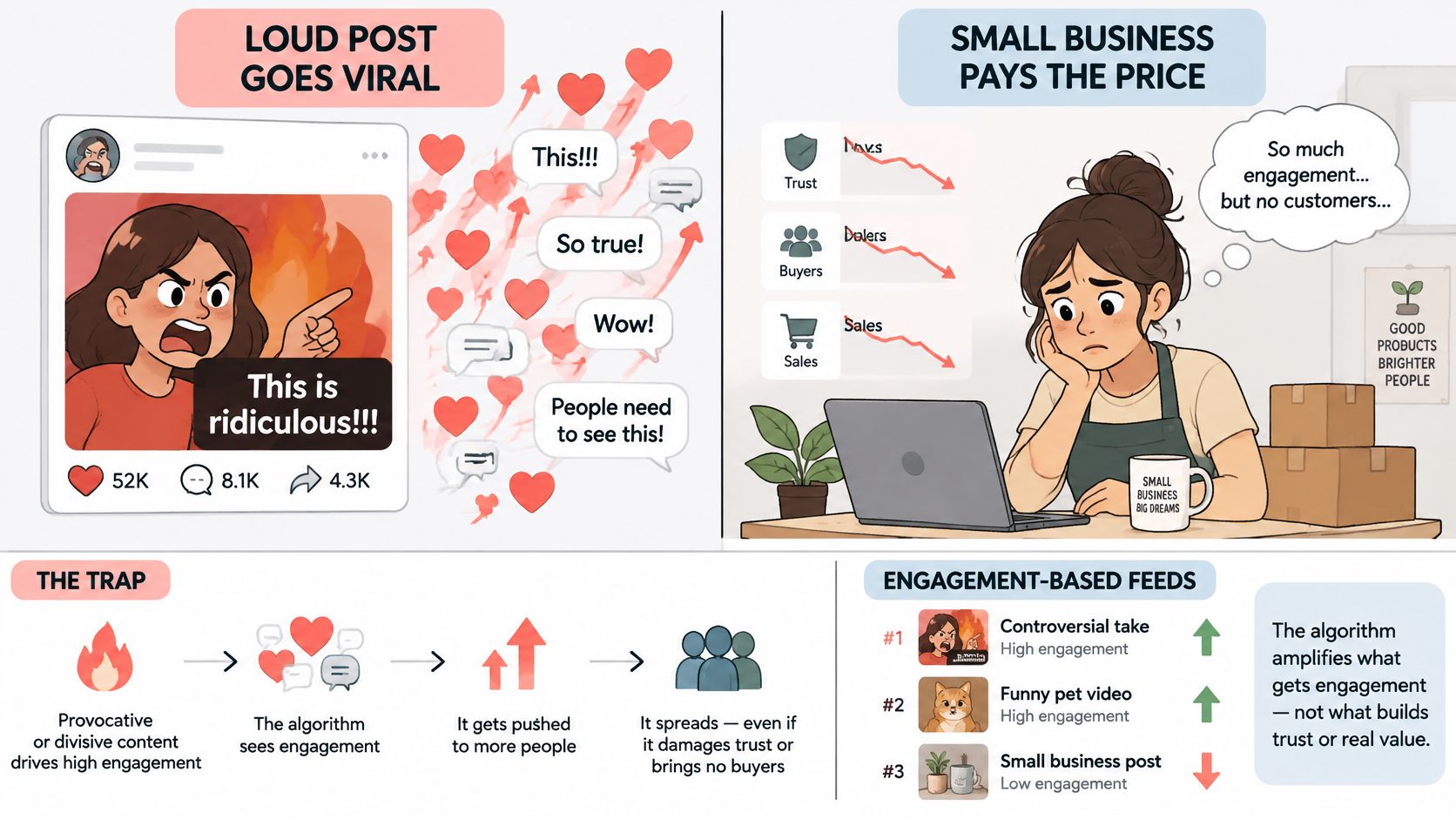
A post can collect hundreds of comments and still be bad for your business. If those comments are arguments, you've bought attention with trust, and that's a poor trade.
Ranking systems push in that direction. A preregistered audit in PNAS Nexus involving 806 Twitter users compared an engagement-based personalized ranking system with a reverse-chronological timeline over two weeks, and relative to the chronological baseline, the engagement-ranked feed amplified emotionally charged and hostile out-group content. You're not running a social network, but you are feeding one. If you optimize only for reactions and reshares, you'll drift toward provocative creative whether you meant to or not.
The image below shows how that trap catches small businesses.
Seven Measures Worth Watching
| Measure | What it tells you | Warning sign |
|---|---|---|
| Qualified clicks | Whether people who clicked match your target customer | Clicks rise while enquiries stay flat |
| Saves and shares | Whether content is useful enough to keep or pass on | Shares come from outrage rather than value |
| Completion rate | Whether viewers watch to the end of a video | Drop-off within the first three seconds |
| Positive sentiment | Tone of replies and mentions | Replies are mainly complaints or mockery |
| Hide or report rate | Whether the audience rejects the content | Any sustained rise week on week |
| Conversion quality | Whether visits turn into enquiries or sales | Leads that never respond or cancel |
| Downstream retention | Whether followers still engage after a month | Followers who joined after a campaign then go silent |
You don't need all seven on day one. Start with qualified clicks, hide rate, and conversion quality, because together they answer the only question that matters. Did the right people act, and did anyone object?
Run a Two-Variant Test
Take one idea and make two versions. The high-arousal variant leads with a bold claim or a surprising hook. The informative variant leads with a useful tip or a clear answer. Show both to matched audiences with the same conversion goal, such as a booking or a pre-order.
Then judge both halves of the result. Short-term distribution tells you which one the platform spread. Post-click outcomes, such as enquiries, purchases, and unsubscribes, tell you which one your business should repeat. They won't always agree, and when they don't, believe the post-click numbers.
Set a simple rhythm. Check engagement and hide rates weekly so you can pull a post that's irritating people. Review conversion quality and retention monthly, and make keep, stop, or scale decisions for each content pillar.
Using AI in Social Media Work Without Losing Trust
Many assume the AI risk is dull, generic captions. It isn't. A key risk is operational, such as publishing a wrong price, pasting a customer's details into a prompt, or posting a synthetic endorsement that looks real.
The picture below shows the safer pattern, with AI assisting while people review.
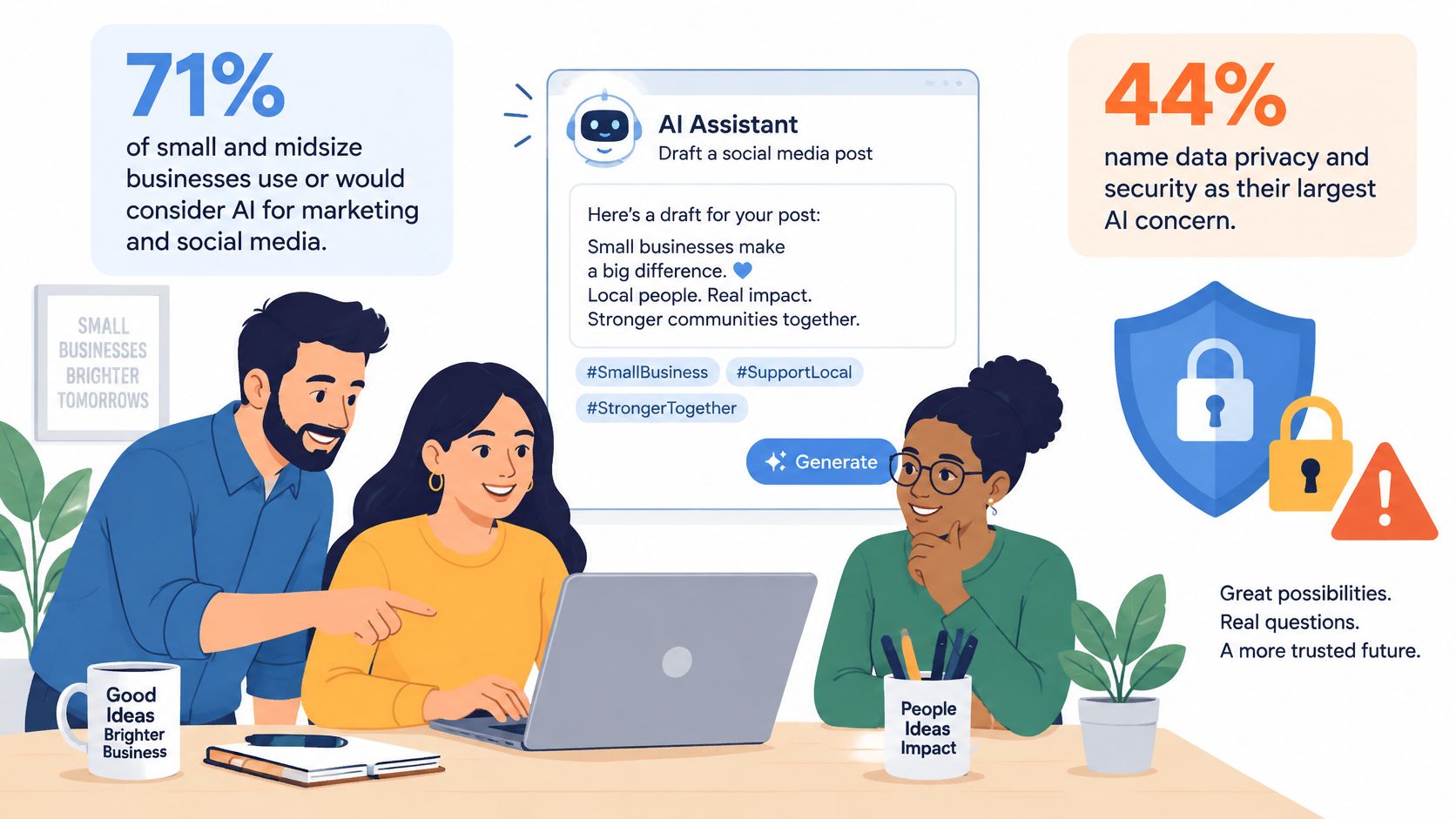
Interest is high and so is anxiety. Reporting on small businesses relying on social media and AI for growth notes that 71% of small and midsize businesses said they use or would consider using AI for marketing and social media, while separate research found 44% of businesses identify data privacy and security as their largest AI concern and 43% worry about the accuracy and reliability of AI outputs. Both instincts are reasonable, so the answer is sorting tasks by risk rather than banning or trusting AI wholesale.
Sort Tasks by Risk
| Task | Risk level | Required control |
|---|---|---|
| Brainstorming post ideas | Low | Spot-check before publishing |
| Reformatting an existing caption for another platform | Low | Spot-check tone and links |
| Drafting product claims, prices or statistics | Higher | Check against the source before publishing |
| Crisis responses | High | Expert review before posting |
| Health or financial statements | High | Expert review and sign-off |
| Influencer identities and synthetic endorsements | High | Disclose the synthetic element and verify identity |
| Direct-message advice | High | Human approval of each reply |
Tools can speed up the low-risk end in particular. If short video ads are part of your plan, the ShortGenius AI ad generator is one option for drafting variations quickly, as long as a person checks every claim and price before anything runs.
The short video below gives a practical look at using AI assistance in everyday social work.
Keep a lightweight checklist taped to the workflow. No confidential data in prompts, human approval for factual claims and customer replies, a source link saved for every statistic, a label on synthetic media when it affects understanding, and a simple log of what was published and who approved it.
Launch Your First 90-Day Plan
Pick one or two platforms and one measurable goal before you open any scheduling tool. Tools make a plan faster, but they can't substitute for one.
A Three-Person Bakery, Month by Month
In month one, the bakery audits its last 30 days of posts and sets a goal of 40 pre-orders a month for weekend pickup. It chooses Instagram and Facebook because local customers already use both, and pauses everything else. That single decision ends the daily debate about where to post.
In month two, the team builds a calendar around three pillars, new bakes, behind the scenes, and customer photos. They batch two weeks of posts on one Monday, answer every message within one working day, and route allergy questions straight to the owner. Nobody guesses who handles what.
In month three, they test a high-arousal post against an informative one, using matched audiences and the same pre-order goal. They review qualified clicks, conversion quality, and response times, then decide to keep, stop, or scale each channel. If one post clearly drives pre-orders, a small paid boost behind it makes sense, but only after the organic test has produced a winner. Paying to amplify an unproven post just buys expensive uncertainty.
Write the one goal and the two platforms on paper today, before you touch any tool.
That scrap of paper is your strategy until the first monthly review. Everything else, the scheduler, the templates, the AI help, exists to serve those two lines.
Creators Toolbox helps designers, developers, and creators keep up with new products, useful tools, product updates, resources, and jobs, which makes it easier to find the scheduling, design, and AI tools your 90-day plan needs without testing everything yourself. Visit Creators Toolbox to browse current tools and resources, then pick one platform, set one measurable goal, and start your first month this week.