Open Source Alternative: How to Judge Licenses and Quality
The usual advice about finding an open source alternative starts with the wrong question: Which free tool replaces this paid one? A better question is whether your team can finish the same work, deliver usable files, and keep the replacement running without spending more than it saves.
A subscription is visible. Migration work, broken integrations, retraining, and emergency maintenance aren't. I would judge a replacement by switching cost and maintenance health first, then use a controlled pilot to decide whether the savings are real.
A Scorecard for Judging Any Open Source Alternative
An open source alternative is replacement software whose source code is published under an Open Source Initiative-approved license, allowing you to inspect, modify, run, and redistribute it under that license's conditions.
Free to download isn't the same as viable. A useful candidate needs to fit your work, have maintainers who respond to problems, and give you a practical way to recover your data.
Build an evidence-based shortlist
Copy this open source alternative scorecard into a spreadsheet. I recommend assessing your strongest two candidates, recording evidence beside each rating rather than relying on memory or a product homepage.
The time windows below are screening rules, not universal measures of project quality. A mature utility may release infrequently, but you'll need evidence that its maintainers still address security and compatibility problems.
| Criterion | What to Check | Green Flag | Red Flag |
|---|---|---|---|
| License | Exact license text and whether commercial use is allowed | OSI-approved license such as MIT, Apache 2.0, or GPL | Custom restrictions or free-for-personal-use terms only |
| Feature fit | Your top five weekly tasks in a trial | Core tasks finish without extra plugins | Key workflow requires a paid add-on or fragile workaround |
| Release activity | Last release date and changelog | Release within the last six months | No release in over a year, with no maintenance explanation |
| Security response | Security policy and advisories | Private reporting channel and dated fixes | No vulnerability contact route |
| Community | Active maintainers and issue replies | Several maintainers; substantive replies within days | Sole maintainer with unresolved issues lingering for months |
| Hosting and support | Who operates it and handles failures | Documented commercial support or managed option | Forum posts only, without an accountable support path |
| Data ownership | Storage location and export behavior | Usable exports in open formats | Essential information trapped in proprietary formats |
Use green for verified suitability, amber for an unresolved question, and red for a blocking problem. My recommended pilot gate is an OSI-approved license, a security rating that isn't red, and at least four green rows. Don't average away a licensing restriction or missing security contact.
Define feature fit before browsing alternatives. Our guide to product discovery services is useful context for separating actual requirements from an attractive feature list.
Inspect maintenance rather than popularity
A comparative analysis published by ACM examined 17 widely deployed open- and closed-source packages and found no significant difference in vulnerability severity, disclosure patterns, or vendor patching behavior. Source visibility gives you inspectability, not a security guarantee.
Look beyond the release badge. Read changelogs for security fixes, inspect whether different people review changes, and distinguish maintainers with merge authority from occasional contributors. A foundation or company can clarify governance, but its name doesn't establish who will respond when your deployment breaks.
For issue response, record the median time to a substantive reply across a consistent sample. Separate ordinary support questions from security reports, and mark private response times as unknown unless maintainers publish them. Check whether advisories identify affected versions and explain the fix.
Practical rule: GitHub stars measure interest. Your shortlist should reflect who maintains the software and how they handle failures.
Specialist comparisons can help you identify tests you would've missed. For browser automation, Clearcote Labs' guide to Playwright and Puppeteer alternatives provides a starting point for comparing candidates against your browser and integration requirements.
We also maintain community feeds for Artificial Intelligence, 3D Design, and Graphic Design. Use community discussion to discover candidates, then verify their suitability in the project's own documentation and repositories.
Which License Terms Decide What You Can Do
The license decides your rights, not the download button or the word free. Check commercial use, redistribution obligations, and whether serving a modified application over a network creates source-sharing duties.
The Open Source Initiative's history describes how its license-review framework established a practical distinction between open-source software and software that is merely available or offered at no cost. That distinction matters when you're building a paid service or shipping modified software to clients.
Compare obligations, not labels
The license types and what they permit table separates common open-source licenses from restricted look-alikes. It's a screening aid, not a substitute for reading the exact license attached to the version you're adopting.
| License | Commercial Use | Must Share Changes | Network Use Triggers Sharing |
|---|---|---|---|
| MIT | Yes | No, but preserve required notices | No |
| Apache 2.0 | Yes | No source-sharing requirement; mark modified files and retain required notices | No |
| GPL v3 | Yes | Corresponding source obligations apply when conveying covered modified software | No, not merely from network use |
| AGPL v3 | Yes | Covered modifications require source access, including for remote users interacting with them | Yes, for covered modified software |
| Business Source License | Production use may be restricted during the initial period | Read the specific grant and additional-use terms | Read the specific network and additional-use terms |
| Proprietary free tier | Only as the terms permit | Source access and modification generally aren't granted | Governed by the service terms |
MIT is permissive, but don't remove its required copyright and license notices. Apache 2.0 adds an express patent grant and notice requirements; marking changed files isn't the same as publishing their source.
GPL v3 obligations become relevant when you convey covered software, including modified versions. AGPL v3 also addresses remote interaction with modified software, which deserves particular attention if you're hosting a customized application for clients.
Say a designer modifies an MIT-licensed template. The license doesn't require publishing those modifications, although required notices still matter. A studio distributing a modified GPL-covered plugin must evaluate the corresponding-source obligations for what it ships.
Check the whole package
A repository's license doesn't automatically cover every bundled font, stock image, model, or plugin. For creative and AI tools, record those components separately and keep copies of their applicable terms.
Service rules are another layer. For a family-facing application, reviewing policies such as 1chat's acceptable use rules for families is a separate exercise from reviewing software rights.
Before approval, read the LICENSE file, inventory bundled components, and describe your intended use in writing. If client distribution or a paid hosted offering creates uncertainty, obtain a qualified license review before launch.
Matching Features to the Tools You Already Use
Choose an alternative for a workflow, not a product name. Replacing Photoshop for web thumbnails is a different decision from replacing it for layered client handoffs and print production.
Use this proprietary tools and their open source options comparison as a test queue. The final column identifies what to investigate, not a declaration that every candidate lacks that capability.
| Proprietary Tool | Open Source Options | Gap to Test First |
|---|---|---|
| Adobe Photoshop | GIMP, Krita | CMYK and color management, plus plugin and action compatibility |
| Adobe Illustrator | Inkscape | Print-ready PDF export and spot color handling |
| Adobe Premiere Pro | Kdenlive, Shotcut | Codec support on your hardware and LUT and effects parity |
| Adobe Lightroom | darktable, RawTherapee | Catalog sync across devices and camera profile coverage |
| Microsoft Word | LibreOffice Writer | Tracked changes and comments in client .docx files |
| Google Docs | Nextcloud Write | Real-time co-editing under your team's load and sharing permissions |
| Figma | Penpot | Auto-layout, component variants, and developer handoff |
Test complete tasks, not isolated features
I recommend listing your five most frequent weekly tasks and selecting an actual project file for each. Mark the result pass, workaround, or fail, with a note explaining what happened.
A pass means the output meets the requirement, not merely that the file opens. A workaround needs a repeatable method and a measured time cost. A fail means you can't produce an acceptable result without returning to the original tool.
For a print designer, retouching quality alone won't settle the GIMP decision. Test the required color-management and proofing path with the intended printer before trusting production output. For a freelancer receiving Word documents, check tracked changes, comment authors, section breaks, and pagination after saving the file.
A feature checkbox doesn't tell you whether a client can continue editing your deliverable.
Include the surrounding workflow. A video editor may finish an edit successfully but lose time rebuilding presets, relinking media, or reproducing an export configuration.
Our side-by-side comparisons cover features, pricing, and workflow suitability, including Canva vs Adobe Photoshop. Use those comparisons to narrow the field, then let your own files determine the result.
Automation needs the same treatment. If a replacement changes triggers, credentials, or file destinations, use our guide to no-code AI automation to help inventory the surrounding process before rebuilding it.
Don't require every application to replace its proprietary counterpart completely. A tool can be a good choice for internal illustrations while remaining unsuitable for editable client handoff. Switch only the workflow whose core task passes.
The Real Cost of Switching Beyond the License Fee
No license fee can still mean a higher first-year cost. Your team pays through labor, infrastructure, support, and interrupted work even when nobody sends a software invoice.
In the global survey summarized by IT Brief's coverage of open-source software use, 57.14% reported installation, configuration, or upgrade problems, while 63.81% struggled to keep software patched and updated. Budget for operational work instead of treating successful installation as the finish line.
Assign every cost an owner
Use a common planning period for all options. I recommend comparing the coming twelve months, including the cost of temporarily retaining the existing subscription.
| Cost Line | Who Pays or Does the Work | How to Estimate It |
|---|---|---|
| Files and templates | Creators or migration contractor | Time a representative batch, then multiply average effort by archive size |
| Training | Users and an internal trainer | Record learning time plus supervised practice |
| Installation and configuration | IT, developer, or hosting vendor | Include permissions, backups, monitoring, and deployment documentation |
| Hosting and maintenance | Operations owner | Include infrastructure, patching, restore tests, and storage |
| Hosted service or commercial support | Purchasing team or owner | Obtain the applicable plan and support scope |
| Downtime and rework | Delivery team | Model recovery time and work that must be repeated |
| Integration rebuilds | Developer or automation owner | Estimate each connector, its tests, and ongoing upkeep |
For example, time a migration on twenty representative files, divide the total effort by twenty, and multiply by the file count you need to migrate. Keep awkward files in the sample, and separate setup time from per-file processing so you don't multiply a one-time cost unnecessarily.
Count integrations individually. A folder-triggered email, an approval notification, and a billing export have different failure conditions; don't bundle them into a vague integration allowance.
Compare labor, cash, and disruption separately
For each option, record labor hours, cash outlay, and expected downtime hours. Convert labor into cost using your own internal rate, but keep the hours visible so you can judge whether the team has capacity.
A solo freelancer should count time diverted from billable work. A studio should name the person responsible for recovery. A larger team should include procurement, security review, and deployment coordination rather than assuming IT absorbs them for free.
Budget test: If nobody has time to maintain it, self-hosting isn't the cheapest option.
A managed version can be economically sensible even when the underlying code is free. Compare the provider's actual responsibilities with the tasks you'd otherwise retain, especially backups and failed upgrades.
We direct readers to each publisher's website for current pricing, availability, and requirements. For a workflow-specific comparison, our Email Studio for Gmail guide can help frame the narrower question of improving an existing process rather than replacing an entire platform.
How to Run a Two-Week Pilot Before You Switch
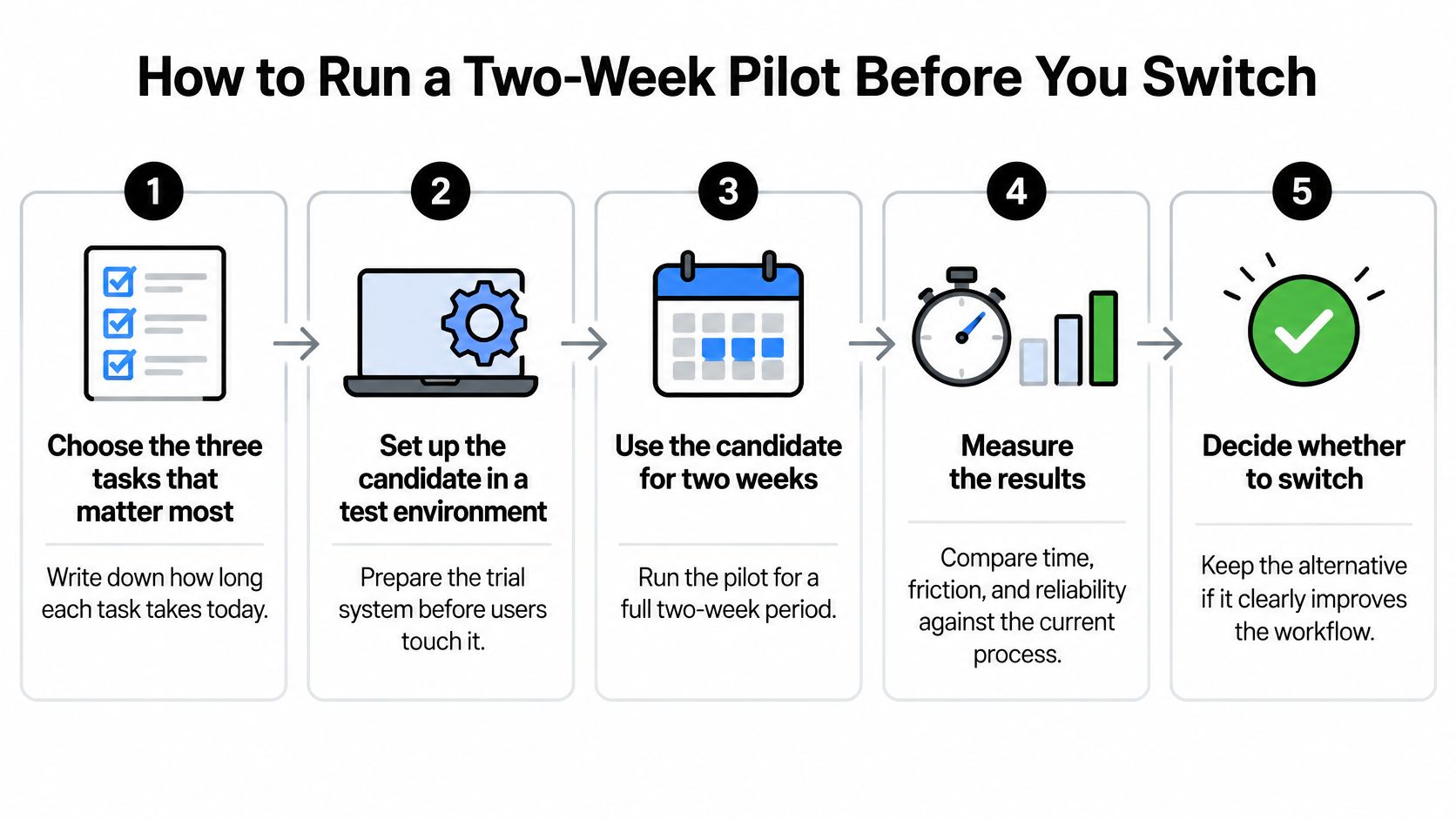
Treat the pilot as a rehearsal for ordinary work and recovery, not a product demonstration. I recommend a two-week test so you can include repeated use, feedback, and an export check without committing the whole team.
Use this process overview to keep the test bounded.
Run the test with real constraints
Choose three critical tasks and establish a baseline. Record how long each takes in the current software, including preparation and delivery. Write down acceptance criteria before testing so enthusiasm doesn't lower the standard.
Prepare an isolated environment. Use a hosted trial, test workstation, or spare server rather than changing production. Configure realistic permissions and backups, and use sanitized files where client agreements prevent copying live material.
Migrate twenty representative files. Include awkward client files, old templates, missing-font cases, and large projects, not just clean samples. Record conversion errors separately from user mistakes so you know what training can fix.
Run and time the selected tasks. Log each outcome as pass, workaround, or fail, with the steps required to reproduce the result. If AI is involved, Zemith's guide to how to choose an LLM can help structure the model-selection questions alongside your application test.
Round-trip the deliverables. Export to the required handoff format and reopen the result in the original software. Check editability, comments, layers, fonts, media links, and other details the recipient needs, because a visually correct preview isn't enough.
Test the support path. Post a genuine technical question in the project's public channel and record response time and usefulness. Never publish a vulnerability there; use the private security-reporting route.
Record the decision and recovery plan. Update the scorecard with pilot evidence, then choose full adoption, internal-only use, or retention of the current tool. Document how you'll recover files and resume work if the replacement fails.
Define a passing result before starting
My suggested acceptance threshold is that all three critical tasks pass, or have documented workarounds taking under ten minutes each, and that exported deliverables open correctly for the intended recipient. Tighten that allowance for high-volume work, where even a short repeated delay may erase the savings.
Don't approve a candidate solely because users prefer its interface. Require an operational owner, an acceptable cost estimate, and a recoverable copy of the pilot output. A technically successful test without anyone responsible for maintenance isn't a production plan.
Decide Whether to Switch This Quarter
For a freelancer without client-specific file requirements, switching is reasonable once the candidate passes the scorecard and pilot. For anyone delivering editable files or handling restricted client data, a partial switch is often the more defensible choice.
Use this switching verdict by situation table to set the boundary. The aim isn't to remove every proprietary application; it's to stop paying for capabilities you no longer need without creating a delivery problem.
| Situation | Verdict | Main Risk |
|---|---|---|
| Solo freelancer with no client-specific formats | Switch once the scorecard passes | Learning time |
| Freelancer handing over Word or Photoshop files | Pilot internally and keep the proprietary tool for client handoff | Format fidelity |
| Small studio with server skills | Switch internal tools and use a managed host for client-facing work | Ongoing maintenance workload |
| Team with compliance or client data rules | Switch only after a documented license and security review | Liability and data handling |
| Organization without IT staff | Choose a paid hosted or commercial-support version | Downtime when updates fail |
Make a bounded commitment
A freelancer can move new internal projects first while keeping old projects in their original environment. That avoids turning an archive conversion into a prerequisite for useful work.
A studio should assign both an operating owner and a backup person before moving shared services. Server skills help, but client-facing availability also requires someone authorized to respond during an incident.
For regulated or contract-bound teams, document where files, logs, backups, and AI requests go. Keep component licenses and hosting terms with the approval record so another person can understand why the deployment was accepted.
An organization without IT staff should evaluate the support contract, not just the hosted application. Confirm who handles failed upgrades, restores, access problems, and exports when the relationship ends.
Choose one workflow with the highest recurring cost or frustration and schedule its pilot this month. Record the scorecard result, actual labor, and handoff outcome before authorizing a wider rollout. A small successful switch is worth more than an ambitious migration nobody can maintain.
Creators Toolbox offers side-by-side tool comparisons, practical guides, and community feeds to help you shortlist an open source alternative for your actual workflow. Visit Creators Toolbox, choose a candidate for your most frustrating paid workflow, and put it through the scorecard and pilot before canceling your subscription.