10 Digital Product Examples to Sell in 2026: Who Buys Them
A designer has a grid system she's used on every brand project for six years. A teacher has a marking routine that halved her weekend workload. A writer has a Friday email that a few thousand people open before their first coffee. Each of them could turn that into a file, a subscription, or a licence, and each is putting it off because the list of possible products is too long to pick from.
The choice gets easier when you stop asking what you could sell and start asking who already wants it. A file sells to someone who needs the outcome by Thursday. A subscription sells to someone who wants that outcome to keep happening. A licence sells to someone who needs to use your work inside their own commercial project, which means a different buyer and much stricter terms.
The audience is there in volume. Visa's commissioned Morning Consult research counted approximately 207 million creators worldwide in 2025, as reported in the 2025 Visa creators report. Almost none of them need a catalogue. They need one product a specific person will pay for this month.
That's the lens for the ten formats below, plus the selling layer that holds them. Every entry answers three things: who buys it, what makes it sellable rather than merely finished, and how a solo creator gets a first version live in a weekend. No definitions, no theory.
Table of Contents
- 1. AmaJova
- 2. Software as a Service Subscriptions
- 3. Digital Design Templates
- 4. Stock Photos, Video, and Graphics Libraries
- 5. Digital Fonts and Typeface Licenses
- 6. Online Courses and Video Tutorials
- 7. Ebooks and Digital Guides
- 8. Presets, LUTs, and Creative Filters
- 9. Software Plugins and Extensions
- 10. Paid Newsletters
- 11. One-Time Purchase Creative Apps
- How the 10 digital product types compare on pricing, buyer, and creation effort
- Turning These Examples Into Your Own Digital Product Line
1. AmaJova
A good digital product can lose the sale on one vague page. A template pack with no preview. A course with no module list. A download where checkout never says whether updates are included. The file can be solid and still fail because the offer leaves the buyer guessing.
AmaJova sits between a DM invoice and a full storefront. It turns a service, a physical product, a digital product, or a live session into a single OfferLink: a shareable page with the title, description, inclusions, price, and fulfilment or booking details, plus checkout and order tracking in one place. One link can sit in a bio, a DM, a campaign, or an existing site.
The screenshot below shows how a digital product offer is laid out.
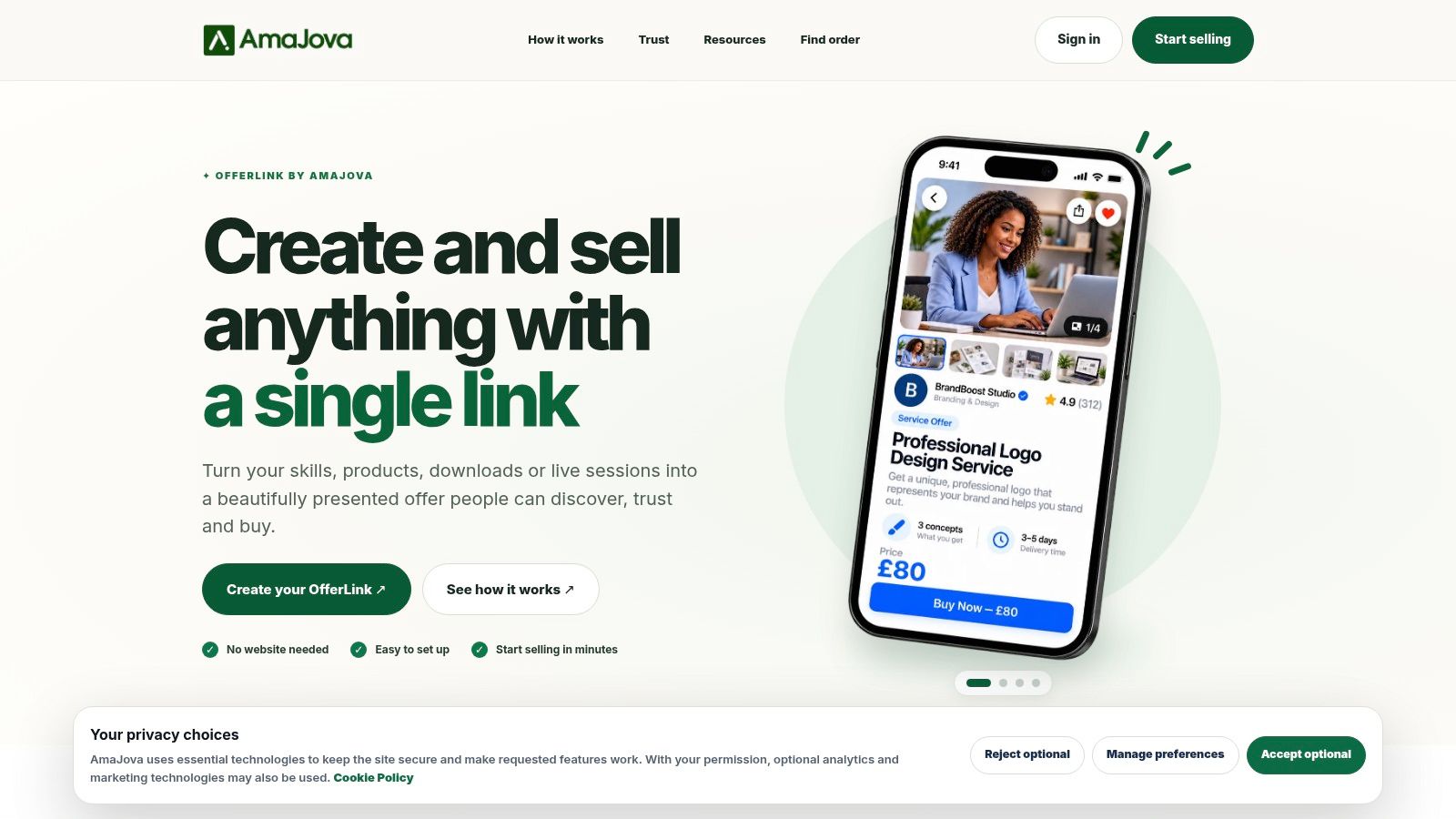
What an OfferLink actually contains
- Structured scope: each page states what is included, how delivery works, and when the buyer hears from you, which kills the message thread that usually follows a sale.
- Checkout with a clear order summary: the buyer sees the total and the terms before paying, instead of meeting surprises after the money moves.
- One order record: messages, delivery or access steps, timeline, payment record, dispute status, and completion tracking sit together instead of scattering across email, DMs, and a spreadsheet.
- Trust signals next to the offer: verification, protection information, and reporting routes appear near the decision point rather than on a buried policy page.
- Delivery expectations in writing: digital access, physical fulfilment, or booking details are stated on the offer, so the buyer knows what happens next.
The guided setup is the part that earns its place for a first-time seller. Media uploads, FAQs, optional extras, boundaries, and expectations get written down before the first buyer arrives. That is also what makes the offer sellable: the buyer can repeat back the outcome without needing you in the thread.
Where it fits and where it doesn't
If you sell a defined offer you can describe in a screen and a half, this is faster than building a storefront, and it avoids custom ecommerce development entirely. If you sell 200 SKUs with variants, bundles, and a search bar, you want a real store, not a link.
It also behaves like a checkout layer rather than a marketplace: it converts traffic you already have and does not supply demand. The buyer is someone who already trusts you enough to click, wants a clear outcome, and needs the admin handled cleanly. With no audience and no channel, spend the weekend on the audience instead. If you do have a channel, the weekend version is one offer: name the outcome, list three to five inclusions, state the delivery window, add proof or preview, price the first ten sales, and put the link where your buyers already are.
The test: hand the offer page to someone who doesn't know you and ask them to explain what they get, when they get it, and what happens if it goes wrong. If they can't, rewrite the page before touching the product.
AmaJova publishes its own walkthrough of digital product examples, which is useful for pressure-testing whether an offer page explains the product clearly.
2. Software as a Service Subscriptions
Nobody buys software because it exists. They buy it because the alternative is a spreadsheet, a manual process, or a person doing the same task forty times a week. Adobe settled this argument for creative tools years ago when it moved Creative Cloud to subscriptions: professionals will pay monthly for continuous updates, cloud storage, and access across devices.
The category's scale is not niche. The International Trade Centre's Global Digital Trade Report puts digitally delivered trade, meaning services and products supplied electronically such as cloud software and downloadable content, at $4.64 trillion in 2024, up from $3.21 trillion in 2020, an average annual growth rate of 9.7%.
The weekend version
You won't build SaaS in a weekend, and anyone who claims otherwise is selling you a course. The weekend version is a hosted workflow: a Notion workspace, an Airtable base, or a Google Sheets tool with a paid access gate and a short Loom walkthrough. Charge for it, watch who renews, then build the actual thing with evidence.
- Works: one narrow job done reliably, annual pricing with a discount, and a changelog buyers can read.
- Doesn't work: feature tiers nobody understands, free plans that cost you support time, and launching before you've fixed the billing edge cases.
Distribution is where SaaS founders spend the least effort. Study product discovery services before you write a line of code.
3. Digital Design Templates
Templates are the most oversupplied product on this list and still the easiest to sell, because the buyer isn't paying for design. They're paying to not start from a blank artboard at 11pm.
The infrastructure is already built. UN Trade and Development reported that businesses in 46 developed and developing economies, representing roughly three-quarters of global gross domestic product, recorded nearly $28 trillion in e-commerce sales in 2024 (UNCTAD). Storefronts, payment processing, and subscription billing are mainstream habits now, not specialist tools.
What makes a template sellable
Canva proved that non-designers will pay for layouts that look professional. The sellers who do well go narrower than Canva can: a 12-slide pitch deck for seed-stage founders, a resume set that survives applicant tracking systems, a 30-post pack for wedding photographers.
- Niche beats volume: ten templates for one job outsell fifty generic ones.
- Show every page: a preview image of the full set, including the boring slides.
- Name the formats: PSD, AI, Figma, or a Canva link, plus which fonts are included.
Build the first version in a weekend by taking a real project you already finished, stripping the content, and rebuilding the layout as a reusable system. Add a one-page guide on customising colours and type.
The licence trap: if you buy a commercial template and resell an edited version, you're usually breaking the terms. Sell templates built from your own layouts, or from assets whose licence explicitly permits resale.
Scheduling the launch is its own job, and a social media scheduling template will keep the promotion from eating the build time.
4. Stock Photos, Video, and Graphics Libraries
Every buyer here is on a deadline. A video editor needs eight seconds of city b-roll by Thursday. A podcast producer needs an intro clip that isn't the same one as every other show. That urgency, not artistic merit, is why libraries sell.
Two pricing models dominate. Per-asset licensing lets you charge for a single strong image. Subscription libraries such as Envato Elements sell unlimited downloads for a flat fee, and that trains buyers to value volume and consistency over one signature shot.
What sells: a cohesive set shot in one light, with a clear theme that stock libraries under-serve. Twenty images of the same workplace, the same colour grade, and the same framing will outperform forty random frames.
What doesn't: uploading whatever's on your hard drive and hoping search finds it. Untagged files die in a catalogue of millions.
The licence trap most sellers ignore: model and property releases. A photo of a person without a release can't be licensed for commercial use, and a recognisable building, logo, or artwork can create the same problem. Check what your chosen marketplace requires before you shoot the set, not after.
5. Digital Fonts and Typeface Licenses
Fonts are software, and they're priced like software that nobody reads the terms of. Two models dominate: open-source libraries such as Google Fonts, which set the buyer's reference price at zero for anything that looks generic, and subscription access such as Adobe Fonts, bundled with Creative Cloud.
That combination squeezes the middle. A paid font has to look distinctive enough to justify a purchase and be licensed clearly enough that a studio won't get cold feet at checkout.
Where the money is: the licence, not the file. Split it properly.
- Desktop licence: install on a machine for print and static design work.
- Web licence: self-hosted webfont files, usually priced by monthly page views.
- App or embedding licence: bundling the file inside software, an ebook, or a PDF, which is often a separate agreement and a separate fee.
Font licensing is the one place where "I bought it" and "I can use it here" are different sentences.
A weekend gets you a display face with two or three weights, tight kerning on the headline characters, and a specimen page. It does not get you a text face for long-form body copy, so don't pretend otherwise. Sell the display cut first, then extend the family if buyers ask.
Variable fonts are worth the effort: one file covers every weight, which matters for web performance and gives you a clean upgrade path.
6. Online Courses and Video Tutorials
Course buyers are usually chasing a deadline, not a transformation. A portfolio review in three weeks. A software migration next month. A junior who needs to be productive by the end of the quarter. Sell to the deadline and the course stops competing with every other course on the internet.
Adobe's Digital Government Index for the United States shows what happens when a team measures the whole chain instead of the front door: a digital health-benefits service that improved communications and strengthened its platforms was associated with a 62% decline in uninsured residents, and its site reached 6.1 million page views per month after traffic grew 64% over three years.
The lesson transfers directly. Traffic and watch time are not the outcome. Completion and the artefact a student produces are. Track acquisition, then task completion, then the outcome, and you'll know whether your problem is discoverability, usability, or teaching.
The accessibility gap most course sellers skip. Accessibility litigation isn't limited to large companies. In a US analysis of web accessibility suits, 67% of businesses sued over web accessibility in 2025 had annual revenue below $25 million, and the 4,928 reported lawsuits were projected to approach 6,176 in 2026 (American Small Business Research).
Captions are not a courtesy. They're the difference between a course that works in a muted feed and one that doesn't.
Practically: caption every video, ship transcripts, and make the workbook a tagged PDF rather than a scan. It widens the market and cuts support tickets.
7. Ebooks and Digital Guides
Ebooks win on a specific kind of topic: the one that changes faster than publishing. A workflow guide for a tool that shipped three months ago. A pricing playbook for a platform that just changed its fees. Leanpub's model, where buyers get new versions as the author writes, fits this better than a static file ever will.
Production is the easy part now. Epidemic Sound's Censuswide study of 3,000 creators found that 91% of professional creators surveyed in the United States and the United Kingdom used AI tools in their content-creation process in 2025 (Epidemic Sound creator economy report). Drafting speed is no longer the constraint. Point of view is.
A weekend build: eight to ten short chapters of 400 to 700 words, each ending with one action, exported as both PDF and reflowable EPUB so it reads on a phone. Publish an update log so buyers see the file is alive.
What doesn't work: a PDF that's really a 90-page sales letter, and a subject with no search demand behind it. If nobody types the question into a search box, nobody buys the answer.
8. Presets, LUTs, and Creative Filters
Presets sell on proof. A before-and-after pair converts better than any description, because the buyer is judging whether their files will look like your files.
Discovery is shifting in a way that changes how you write that proof. Euromonitor's report on digital shopper trends found, across 2,400 consumers in Singapore, Malaysia, Indonesia, Thailand, Vietnam, and the Philippines, that 24% already use generative AI to support shopping decisions, while 67% purchased a product because a creator recommended it and 38% trust creators and AI equally (Euromonitor).
That last figure is the useful one. AI recommendation and creator recommendation run in parallel rather than replacing each other, so a preset pack needs both machine-readable clarity and human proof: exact camera and profile tested, what the look does to skin tones, and a named creator standing behind it.
The image below is the workflow in miniature.
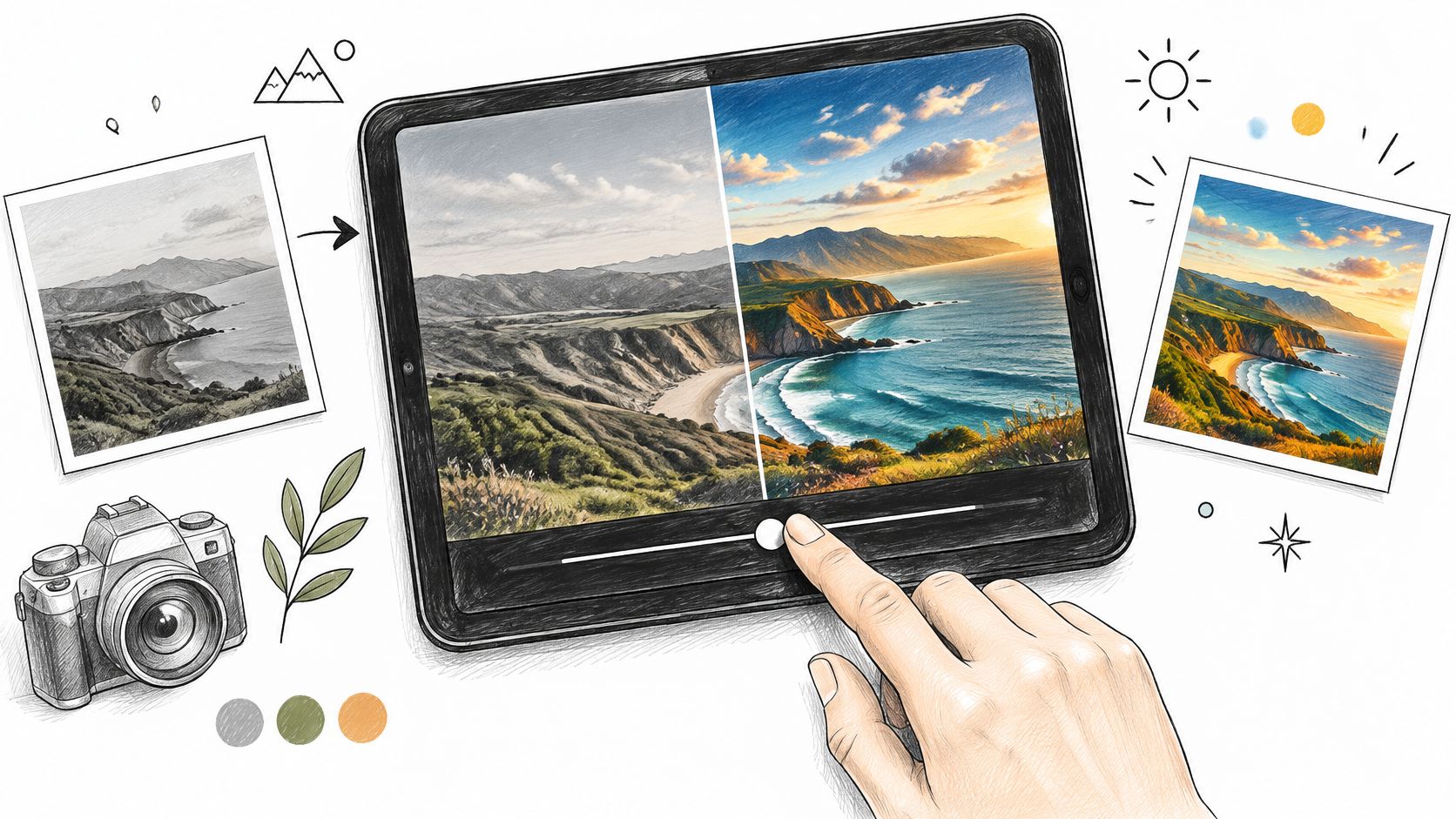
The technical trap: a Lightroom preset is a set of slider values, so it looks different on a different camera profile, in JPEG versus RAW, and under different white balance. Say what you tested it on. For video LUTs in .cube format, state the colour space, because a LUT built for log footage will wreck Rec.709 footage.
Build eight to twelve presets from one shoot in a weekend, and ship a one-page install guide with each.
9. Software Plugins and Extensions
Plugins are the only product on this list where you keep working after the sale. Your code runs inside someone else's application, and that application ships updates on its own schedule.
North Carolina's State Unemployment Insurance Tax System shows what disciplined delivery looks like at that level of dependency: it went live in November 2023 after roughly 14 months, using 3,489 functional test cases across 90 state, federal, and third-party interfaces, and by May 2, 2024 had 99,464 users processing wage and payment transactions (NASCIO case study).
You won't run that process solo, but the principle holds. Test against the version of the host app shipping next month, not the one installed on your machine.
A weekend plugin does one repetitive thing: renames layers to a convention, exports variants at fixed sizes, batch-applies a style. Price it as an annual per-seat licence so renewals fund the maintenance.
An update to the host application is not an edge case. It's the main event.
What doesn't work: undocumented permissions, no changelog, and a support email that goes quiet. Figma's community and Adobe's extension ecosystem both punish abandoned plugins fast, because installation is one click and uninstall is too.
10. Paid Newsletters
Paid newsletters are the only format here where the product and the distribution channel are the same thing. That's the appeal and the trap. You don't rent an audience from an algorithm, but you also can't stop publishing without losing revenue.
Competition for attention is expensive. U.S. creator advertising spend was projected to reach $37 billion in 2025, a 26% year-over-year increase, according to the Interactive Advertising Bureau. Competing on reach is a losing game for a solo writer. Competing on a narrow promise isn't.
Substack popularised the model: free tier to build the list, paid tier for the deep material, one archive that keeps selling while you sleep. It works when the promise is specific, such as a Monday teardown of one real pricing page.
- Works: a fixed schedule, one narrow beat, and a paid tier that adds analysis rather than extra posts.
- Doesn't work: daily publishing with no archive value, and paywalling the thing that made people subscribe.
If your writing lives in Gmail, email studio for Gmail is worth a look before you add another subscription to the stack.
11. One-Time Purchase Creative Apps
One-time pricing is a positioning decision, not just a billing one. Procreate, built by Australian studio Savage Interactive, has held a loyal iPad user base on a single upfront payment while competitors moved to subscriptions. Buyers notice, and they reward it with word of mouth.
Appetite for installing software is real. Global software downloads increased by 43.6% in 2024, reaching 262.55 million downloads, according to Softonic's 2024 software-download report.
The math is the trade-off. Revenue stops at the sale, so you either need volume, paid add-ons such as brush packs and extensions, or a paid major version later. A weekend gets you a focused tool that does one thing on one platform, and that's the right first release.
- Works: native optimisation, a clear one-time price, and add-on packs that fund updates.
- Doesn't work: promising cross-platform parity you can't maintain, and shipping to five platforms before one of them is solid.
How the 10 digital product types compare on pricing, buyer, and creation effort
| Item | Typical Pricing Model | Best For | Creation Effort | Main Trade-Off |
|---|---|---|---|---|
| AmaJova | Secure checkout; fees vary by offer and seller | Selling services or digital and physical products through one link | Low; guided offer setup | Less storefront customization than a full ecommerce site |
| Software as a Service (SaaS) Subscriptions | Monthly or annual subscription | Users who want cloud access, updates, and cross-device tools | High; software development and ongoing updates | Costs accumulate, and access ends if payments lapse |
| Digital Design Templates | Usually one-time purchase or license | Creators who need customizable designs quickly | Medium; create reusable layouts | Templates can look generic, and licenses vary |
| Stock Photos, Video, and Graphics Libraries | Subscription or per-asset license | Teams needing ready-made media assets | High; build and maintain a searchable catalog | Usage restrictions and widely reused assets |
| Digital Fonts and Typeface Licenses | Free/open-source or paid license | Designers needing typefaces for specific uses | High; design and develop font families | Licensing can be complex and commercial fonts costly |
| Online Courses and Video Tutorials | Subscription or per-course purchase | Learners seeking flexible, self-paced instruction | High; develop lessons and learning materials | Completion depends on learner motivation and practice |
| Ebooks and Digital Guides | One-time purchase; sometimes pay what you want | Authors sharing knowledge in a low-cost digital format | Medium; write, edit, and format content | Crowded market and easy unauthorized sharing |
| Presets, LUTs, and Creative Filters | Typically one-time purchase per pack | Creators seeking faster, consistent photo or video edits | Medium; develop and test settings | Results vary with source media and software compatibility |
| Software Plugins and Extensions | Free or paid purchase | Users who want specialized features or workflow automation | High; build and maintain compatible software | Updates can break compatibility, with potential security risks |
| Paid Newsletters | Recurring subscription | Writers offering regular editorial content to loyal readers | Ongoing; publish consistently | Requires steady publishing and audience growth |
| One-Time Purchase Creative Apps | Single upfront payment; optional add-ons | Buyers who prefer creative tools without recurring fees | High; develop and maintain an app | Limited recurring revenue can constrain updates and platform support |
Turning These Examples Into Your Own Digital Product Line
The order of operations matters more than the format you pick. Most first products fail because the creator starts with the build instead of the buyer.
Step one: match the format to evidence you already have. Look at what people ask you for free. If colleagues keep asking for your checklist, you have a template or a guide. If they ask you to do the work, you have a service that can become a course or a productised offer. If they ask how you got that look, you have presets. The format follows the question, not the other way round.
Step two: validate with a small version, priced low or free. A five-page guide, three presets, one template, a 30-minute recorded walkthrough. Put it in front of the people who already asked, and watch whether they download it, finish it, and ask for more. A waitlist or pre-sale before you build the full thing tells you more than any amount of planning.
Step three: read the licence before you sell anything built on third-party assets. Many beginners get burned at this stage. A commercial template that forbids resale, a stock clip without a model release, a font licensed for desktop only, a LUT built for the wrong colour space. Check the terms on the publisher's own site, because marketplaces change them, and keep a copy of what applied on the day you shipped.
Then price the first version to remove hesitation. A buyer who has never heard of you will take a small risk; they won't take a large one. Raise the price after you have three testimonials and a delivery record you can point to.
The rule that survives every format: the product is the promise plus the delivery. If the promise is clearer than the delivery, you get refunds. If the delivery is better than the promise, you get referrals.
Keep the delivery promise small and specific. "Twenty presets tested on Sony and Canon RAW files, with a one-page install guide" beats "a complete editing system" every time, because the buyer can check it.
Creators Toolbox tracks new tools, product updates, and resources weekly, and our comparison pages cover features and pricing side by side when you're choosing between two options. If you've built something worth selling, use our Submit product option and send it over for review. We look at new releases every week at Creators Toolbox, and a product that solves a specific problem for a specific buyer is exactly what we want to see.