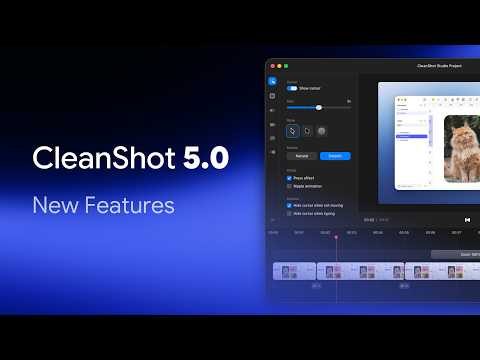


CleanShot 5.0 adds Studio Mode for turning screen recordings into polished videos. It's available on all plans, with no subscription required.
Read the original announcement →
The Mac screenshot and screen recording app — annotate, scroll-capture, record GIFs and video, pin to screen, and share via cloud link. Version 5.0 adds Studio Mode for polished recordings.
CleanShot is the Mac screenshot and screen recording app that replaced the built-in tools for a lot of designers and developers. Capture an area, window, or full screen, scroll-capture a whole page, record the screen as a GIF or video, and hide your desktop icons while you do it. The annotation editor handles arrows, shapes, highlights, blur, text, and step counters, and any capture can be pinned to the screen as a floating reference or shared instantly through a CleanShot Cloud link.
Text in screenshots is searchable and copyable through OCR, and a history keeps every capture a click away. CleanShot 5.0 introduces Studio Mode, which turns a simple screen recording into a polished, professional video, available on all plans. Sold as a one-time purchase, with an optional Cloud Pro plan for more sharing and storage.
Pricing model: Paid
Common questions about CleanShot
CleanShot 5.0 adds Studio Mode for turning screen recordings into polished videos. It's available on all plans, with no subscription required.
Read the original announcement →
Official videos and tutorials for CleanShot.
Other products to explore and follow.
The people behind CleanShot

Screen recorder for your 9th take. A lightweight macOS menu bar app to capture, record, trim, copy, or export any screen region in a few clicks.
Local-first clipboard and screenshot history app for Mac — searchable timeline of copied text, links, images, files, code, and colors.
macOS capture workspace — screenshots, screen recordings and full-page web captures, edited, auto-organised by on-device AI, and shared as a link.

A Mac screen capture and recording app with cinematic zooms, backgrounds, and transcript-based video editing.
Native macOS screen recorder and video editor — record, screenshot, animate text and captions, add music, and export product videos in 4K.
A remarkably well-behaved browser engineered specifically for macOS — quietly intelligent, beautifully native, and built on Chromium.