Webflow shows spacing values directly on the canvas
By Steven Van ·
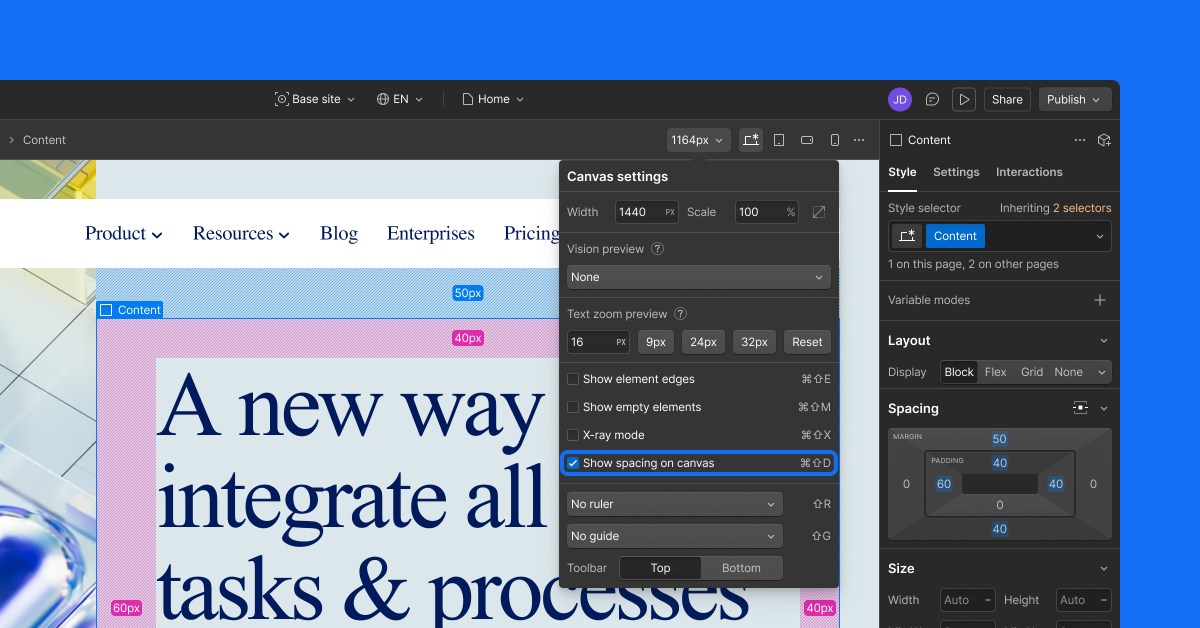
Toggle it in Canvas settings or press Cmd+Shift+D to see margin and padding on any element without opening the Style panel.
Margin and padding values now show directly on the canvas in Webflow's designer. Checking spacing used to mean selecting an element and reading the Style panel; now the numbers appear on the element itself.
- Turn on the spacing option in Canvas settings, or press Cmd+Shift+D, and clicking any element reveals its margins and padding.
- Holding Alt/Opt+Shift and hovering over an element shows spacing values under the cursor, with no click or selection needed.
- The numbers reflect current calculated values, including those set through variables, and match what ships to production.
This release only makes spacing visible; changing a value still happens in the Style panel. Webflow announced the update on 5 May 2026.

Webflow
Build professional websites visually — no code required, with CMS, interactions, and hosting built in.
View Webflow →