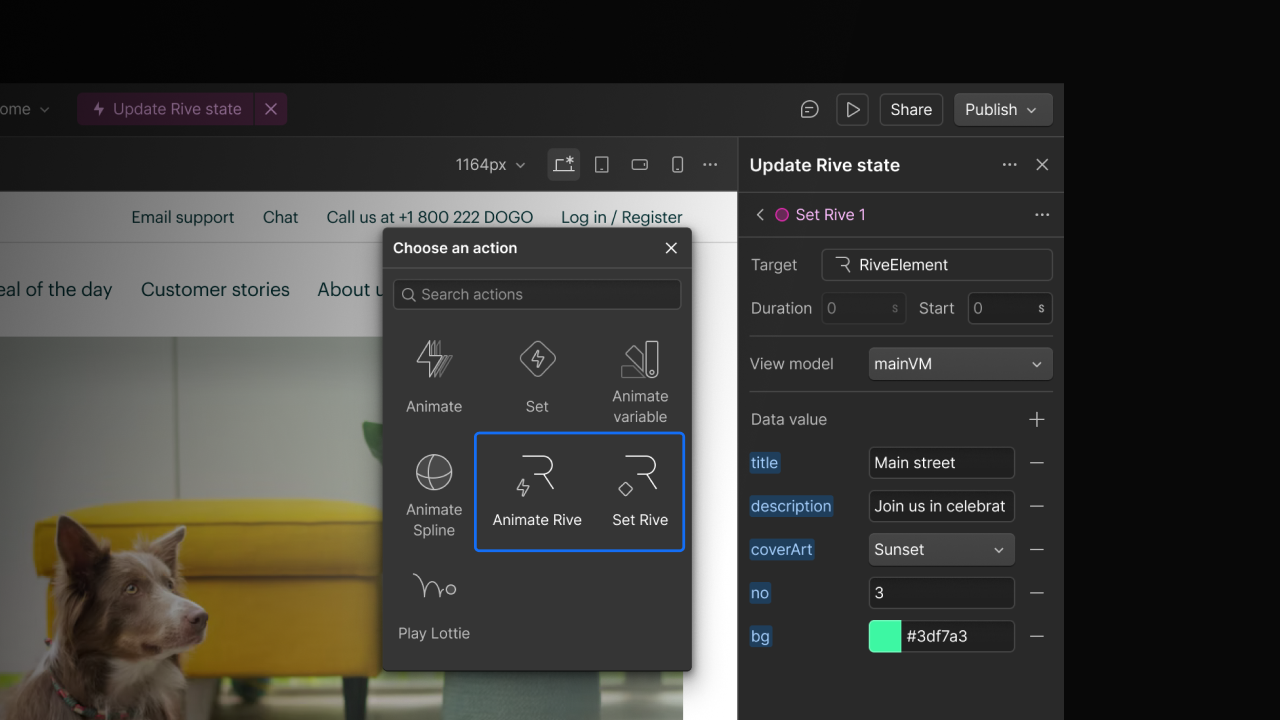
Webflow Interactions can now drive Rive animations
By Steven Van ·
Bind triggers to Rive ViewModel data, switch artboard states, and get smoother edges via the new @rive-app/webgl2 package.
Webflow's Interactions with GSAP can now control Rive animations directly from the canvas, binding interaction triggers to data inside a Rive scene so it responds as visitors scroll, click, or navigate.
- Control ViewModel data exposed by a Rive file, including artboards, numbers, text, colors, booleans, and enums.
- Transition between artboard states within a single Rive component, so multi-scene animations no longer need multiple embeds.
- Trigger Rive's built-in state machine transitions at a specific point in the interaction timeline.
- Vector feathering for smoother anti-aliased edges on shapes, text, and strokes, via the new @rive-app/webgl2 package.
In the Designer, selecting a Rive element and opening the Interactions panel exposes "Set Rive" and "Animate Rive" action types, which pull in the loaded .riv file's ViewModels and properties automatically. These can sit on the same timeline as transforms and opacity changes; color properties accept hex, RGB, HSL, or named colors, and original values are captured at the start of each interaction so reverse playback restores the initial state.