Social Media Scheduler Comparison The Ultimate 2026 Guide
By Steven Van ·
Struggling to choose a tool? Our 2026 social media scheduler comparison breaks down the best options with real-world scenarios and in-depth analysis.
Feeling overwhelmed by the sheer number of social media schedulers? You're not the only one. Picking the right tool can completely change your workflow and supercharge your results, but the wrong choice just leads to frustration and wasted time. A smart social media scheduler comparison is all about matching the right features—like AI content tools, in-depth analytics, and team collaboration—to what you actually need.
Choosing Your Social Media Scheduler in 2026

The market for these tools is packed, and every platform promises to save you hours while blowing up your reach. But here’s the thing: a one-size-fits-all tool simply doesn't exist. What works for a solo creator crushing it on Instagram and TikTok is completely different from what a B2B agency needs to manage client accounts on LinkedIn.
This guide cuts through the noise. We’re not just listing features; we’re diving into a practical, side-by-side comparison of four top contenders: Buffer, Later, Sprout Social, and Metricool. We’ll focus on what actually matters in your day-to-day grind and for your long-term growth.
We’ll be judging them on a few key points:
- Platform Integrations: How well do they really play with essential networks like Instagram, TikTok, and LinkedIn?
- AI Content Features: Are the AI tools actually helpful for drafting posts and repurposing content, or are they just a gimmick?
- Analytics and Reporting: Can you get beyond vanity metrics and track what truly drives growth?
- Scalability and Pricing: Will the tool grow with your brand, or will you hit a paywall just as you start getting traction?
The goal here isn't just finding a good tool, it’s about finding the right tool for you. Making a solid choice now is an investment that pays you back with hours of reclaimed time and a more effective social media strategy.
To get you started, the table below gives a quick look at who each scheduler is best for. Think of this as your starting line before we get into the nitty-gritty details. If you want to explore even more options, you might check out a definitive guide to the best social media scheduling tools for a broader look at the market.
| User Archetype | Recommended Scheduler | Key Strength |
|---|---|---|
| The Solo Creator | Later | Unbeatable visual planning for Instagram & TikTok. |
| The Small Business | Buffer | Simplicity and all-in-one engagement features. |
| The Marketing Agency | Sprout Social | Robust client management and reporting tools. |
| The Data-Driven Marketer | Metricool | Deep competitor analysis and ad integration. |
Breaking Down the Key Scheduler Features
It’s easy to get lost in the marketing hype. To really figure out which tool is right for you, we have to look past the sales pitch and see what these platforms actually do. A feature list can be deceiving; what really matters is how those features work in your day-to-day.
The subtle differences in how a tool handles scheduling, analytics, or content creation can be the difference between a great investment and a daily frustration. Let's get into the nitty-gritty of Buffer, Later, Sprout Social, and Metricool to see where they really deliver.
To get a clear, at-a-glance view, let's start with a high-level comparison of their core capabilities. This table breaks down what you can expect from each platform in the areas that matter most.
In-Depth Social Media Scheduler Feature Analysis
A detailed comparison of top schedulers, analyzing supported platforms, AI content capabilities, analytics depth, and collaboration features for a comprehensive evaluation.
| Feature | Buffer | Later | Sprout Social | Metricool |
|---|---|---|---|---|
| Supported Platforms | Excellent (incl. Mastodon, Bluesky) | Strong (Instagram & TikTok focus) | Excellent (deep API integrations) | Excellent (incl. Twitch, ad platforms) |
| AI Content Capabilities | Good (idea generation, repurposing) | Good (caption & hashtag suggestions) | Excellent (content ideation, rewrites) | Excellent (analytics insights, summaries) |
| Analytics Depth | Good (clean, user-friendly reports) | Strong (visual platform focus) | Excellent (enterprise-grade, ROI tracking) | Excellent (competitor analysis, ad data) |
| Collaboration | Good (simple approval workflows) | Good (team notes, access levels) | Excellent (advanced permissions, audit trails) | Strong (client reports, team roles) |
This table gives you the lay of the land, but the real story is in the details. Now, let’s explore how these features translate into real-world use.
H3 Platform Support and Posting Nuances
The first and most basic test for any scheduler is whether it can actually post to your most important platforms. While most tools cover the big names, the quality of that support varies wildly. Some might "support" TikTok but only offer scheduling reminders, forcing you to post manually. That’s not a real time-saver.
- Later: No surprise here—Later was born from Instagram. Its direct scheduling for Reels, Stories, and even the first comment is the best you'll find. It’s also a powerhouse for TikTok, making it the clear winner for anyone focused on visual media. Its support for LinkedIn and X (formerly Twitter) is solid but feels more like a standard add-on.
- Buffer: Buffer is the dependable workhorse. It offers broad and reliable support across all the major platforms and has been quick to add newer ones like Mastodon and Bluesky. Its strength is its simple, no-fuss queue that just works, making it perfect for businesses that need a balanced, multi-platform presence without a lot of complexity.
- Sprout Social: Built for the enterprise crowd, Sprout offers deep, API-level integrations for all the big players. It truly shines on LinkedIn, with advanced audience targeting and analytics that B2B marketers need. Its TikTok integration is also top-notch, going far beyond basic scheduling to include deep performance metrics.
- Metricool: Metricool’s secret weapon is its support for platforms others ignore, like Twitch. It also connects directly to Google and Meta ad accounts, which means you can schedule and analyze your organic and paid content all in one place—a huge plus.
The real differentiator is how a tool handles the little things. Can you add a first comment to an Instagram post? Set a custom YouTube thumbnail? Create a LinkedIn poll? A scheduler that handles these platform-specific features from its own dashboard will save you a massive amount of time.
H3 The Content Calendar and Visual Planning Experience
Your content calendar is your mission control. A clean, visual calendar makes planning feel effortless, while a clunky interface just gets in the way. This is where user experience really counts.
Later is the undisputed champion of visual planning. Its drag-and-drop grid for Instagram is its signature feature, giving you a pixel-perfect preview of your feed. For brand-conscious creators and e-commerce businesses, this is a non-negotiable.
Buffer, on the other hand, uses a more traditional list-based calendar. It's clean and functional for managing a content queue, but it doesn't have the aesthetic planning power of Later. Sprout Social and Metricool offer more advanced calendars with robust filtering by campaign, content type, or approval status, which is a must-have for agencies and larger teams juggling complex strategies.
H3 AI Features and Automation: Hype vs. Reality
In 2026, AI isn't just a buzzword anymore—it's a standard feature. But how it's used varies a lot. Some tools use AI to spit out entire posts, while others focus on helping you refine what you’ve already created.
Sprout Social and Metricool have the most sophisticated AI assistants. Sprout’s AI can brainstorm post ideas, rewrite captions in different tones, and even analyze your past performance to suggest the best times to post. Metricool’s AI is a data wizard, helping you spot trends in your analytics and automatically summarizing performance reports.
Later's AI is more focused, generating caption ideas and suggesting relevant hashtags—perfectly suited for its visually-driven audience. Buffer’s AI Assistant is built for simplicity, helping you repurpose content and brainstorm ideas without overwhelming you with options. The real value of these tools is how they fit into your workflow, a topic we cover in our guide to the most popular social media tools for creators.
H3 Digging into Analytics and Reporting
If you can't measure it, you can't improve it. Basic metrics like likes and comments are a given. The best schedulers give you actionable insights that connect your social media efforts to actual business goals.
Metricool is an absolute dream for anyone who loves data. Its standout feature is its powerful competitor analysis, which lets you track and benchmark your performance against other accounts in your space. By pulling in website, social, and ad data, it gives you a complete view of your digital marketing.
Sprout Social offers enterprise-level reporting with fully customizable dashboards, ROI tracking, and team performance reports. It’s built for agencies and marketing departments who need to prove the value of their work to leadership. Buffer provides clean, simple analytics that are perfect for small businesses, while Later offers detailed metrics for Instagram and TikTok, including crucial data like reach, save rate, and personalized best times to post.
Analyzing Pricing Plans and Long-Term Value
The sticker price on a social media scheduler rarely tells the whole story. To truly understand what you're signing up for, you have to look past the monthly fee and evaluate the pricing plans and long-term value of each tool.
A low starting price can be tempting, but hidden costs often hide just beneath the surface. You might run into limits on users, scheduled posts, or social profiles that trigger surprisingly expensive overage fees or force you into a premature, costly upgrade.
Decoding Free vs Paid Tiers
Free plans are a great way to test the waters, but they’re always designed with limitations meant to get you to upgrade. Buffer’s free plan, for example, lets you connect up to three accounts but caps you at 10 scheduled posts per channel. That’s fine for a beginner, but an active brand will hit that wall almost immediately.
Metricool, on the other hand, gives you a bit more breathing room on its free tier, offering one brand and up to 50 scheduled posts a month. This makes it a genuinely viable option for solo creators, but you’ll miss out on key features like competitor analysis, which are locked behind the paywall.
The most important question to ask when considering a free plan is: "What is the primary limitation, and how soon will I hit it?" If the cap is on scheduled posts, a high-volume creator will outgrow it in weeks. If it’s on users, a growing team will face an immediate roadblock.
Trying to work around these limits instead of focusing on your strategy is a false economy. A free plan loses its value fast if it’s holding back your growth.
Calculating Cost Per Feature and User
For paid plans, you need to break down the cost-per-feature and cost-per-user. A tool might have a lower entry price but then charge a ton for each additional team member you add.
- Buffer's model is unique, charging $6 per month per channel. This is a great deal if you’re laser-focused on just a few platforms, but the cost can climb quickly as your brand expands.
- Later's plans are bundled. Its $18.75/month Starter plan includes one user and a set of accounts, giving solo entrepreneurs a predictable, fixed cost.
- Sprout Social is priced on a per-user basis, starting at a steep $249/month per user. While that number might cause some sticker shock, it includes an enterprise-level feature set, making the cost-per-feature worthwhile for large teams and agencies that need serious collaboration and reporting tools.
Thinking this way helps you project your costs down the road. If you know you're adding two more people in the next six months, a platform with a high per-user fee might not be sustainable, even if its base price looks good today.
Assessing Scalability and Long-Term Investment
Finally, you have to think about scalability. The goal is to pick a scheduler that grows with you, not one you’ll have to ditch in a year. A platform with a clear and logical upgrade path saves you the massive headache of migrating to a whole new system later on.
Look at the features unlocked in the higher tiers. Do they match your long-term goals? For instance, if you plan to get serious about video, you'll want a tool that can help you repurpose your content for different platforms.
Tools like Sprout Social and Agorapulse are built from the ground up to scale, offering features like client management, white-label reports, and advanced approval workflows in their premium plans. In contrast, a tool like Later is more dialed in for the creator and small business crowd, with less emphasis on enterprise team functions. Your choice should be an investment in your future workflow, not just a patch for today’s problems.
Matching The Best Scheduler To Your Use Case
Feature lists and pricing charts are great, but they don't tell the whole story. The real value of a tool comes out when you see how it fits into your actual day-to-day work. This is where we go beyond the spec sheets and get into practical, real-world advice.
To help you find that perfect fit, we've broken it down by four common creator and business types. See which one sounds most like you, and you'll get a recommendation tailored to your specific needs and workflow. You're not just buying a list of features; you're investing in a solution that will actually make your life easier.
The Solo Creator: The Visual Storyteller
You live and breathe visual content. Your brand is all about that perfect Instagram grid, killer TikTok videos, and a consistent look across every platform. You need a tool that acts more like a creative partner—something that prioritizes visual planning but won’t break the bank for a one-person operation.
For you, Later is the clear winner.
Its most famous feature is the visual Instagram planner. It lets you drag and drop posts to preview exactly how your grid will look before anything goes live. For a visual-first brand, this isn't just a perk; it's a necessity. Later also has deep ties with Instagram and TikTok, offering direct scheduling for Reels and Stories, which means no more clunky workarounds for your most important channels.
Key Takeaway: Later is the top choice for solo creators because it was designed specifically for visual platforms. Its intuitive layout and focus on aesthetics solve the biggest challenges for anyone building a brand on Instagram and TikTok.
The Small Business: The All-In-One Hub
As a small business owner, you're juggling a dozen different tasks at once. You need a scheduler that’s simple, reliable, and brings everything into one place without a massive learning curve or a scary price tag. The goal is efficiency and consistency, plus the ability to chat with your audience without constantly switching apps.
Your best bet is Buffer.
Even in the crowded scheduler market of 2026, Buffer remains the top pick for its sheer simplicity and affordability. It's been shown to save users an average of 6.3 hours per week compared to posting manually—that's over 328 hours back in your pocket every year. Its clean interface and easy-to-understand scheduling queue make getting started a breeze.
Buffer’s “pay-per-channel” model is also ideal for small businesses. You can start with just what you need and scale up from there. The engagement tools are a game-changer, pulling all your comments and mentions into a single, simple feed so you can manage your community and your content in one spot.
This decision tree helps visualize how different needs—from budget to team size—point toward different types of schedulers.
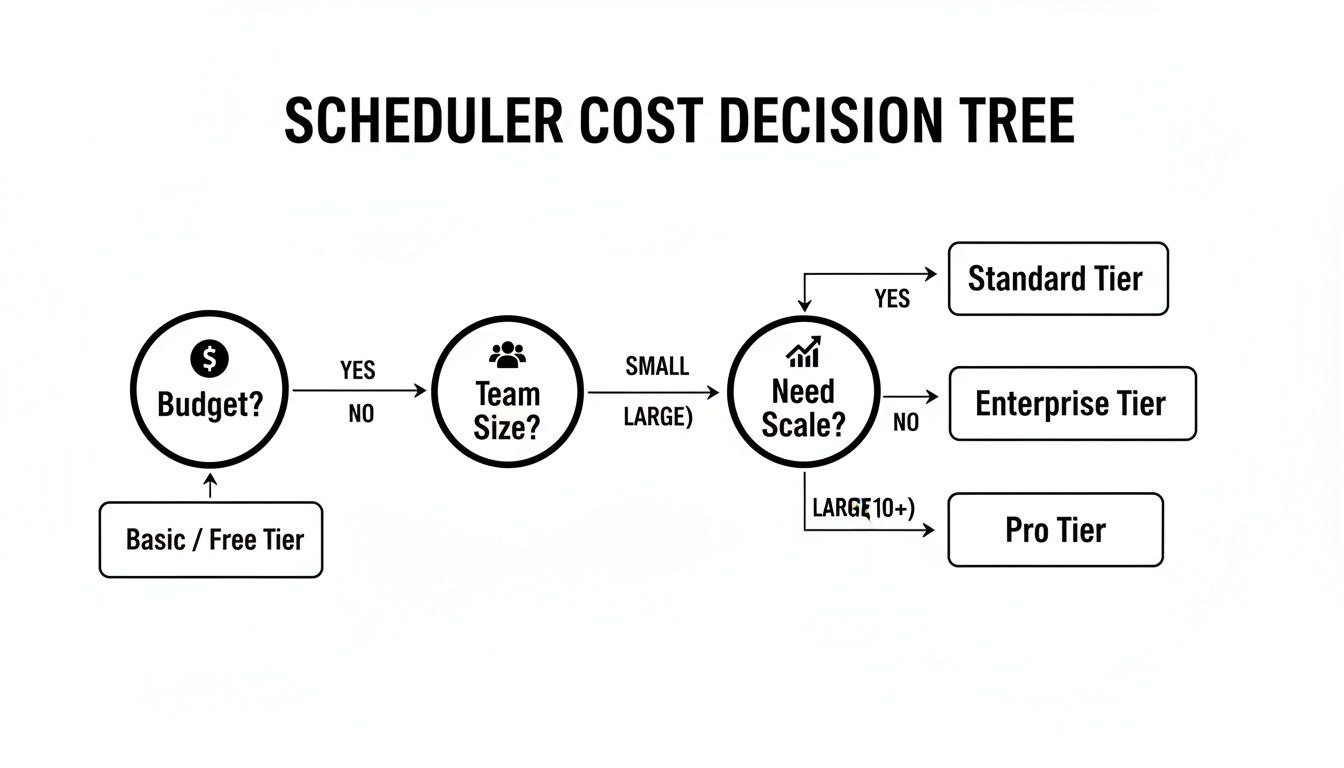 As you can see, entry-level needs line up with more affordable tools, while complex team requirements and plans for growth justify investing in a higher-tier enterprise platform.
The Marketing Agency: The Client Management Powerhouse
Your world revolves around juggling multiple clients, each with their own brand voice, content calendars, and reporting demands. You need a rock-solid platform built for collaboration, approval workflows, and proving your worth with hard numbers. It has to offer tight control, top-notch security, and professional, white-label reports.
For agencies, Sprout Social is the industry standard for good reason.
Sprout Social was designed from the ground up for complex team structures. Its advanced permission settings let you give clients and team members specific access, ensuring no post goes live before it's been properly approved. The platform's powerful listening and analytics tools help you deliver real insights to clients, going way beyond vanity metrics to show actual business impact. Plus, features like the Smart Inbox and a shared asset library make cross-team collaboration incredibly smooth.
If you’re managing several clients but need a more wallet-friendly option with solid team features, check out our in-depth review of Publer, which really shines in organizing different client workspaces.
The Data-Driven Marketer: The Analytics Expert
You're all about the numbers. Every decision you make is backed by performance metrics, competitor analysis, and campaign ROI. You need a tool that connects the dots between your organic social, paid ads, and website traffic to give you a full 360-degree view of your marketing efforts.
The obvious choice here is Metricool.
Metricool is an analyst's dream. Its killer feature is its powerful competitor tracking, which lets you benchmark your performance against everyone else in your space. It pulls data from your social accounts, ad platforms (Google and Meta), and your website into a single, unified dashboard.
This is the kind of holistic view most schedulers simply can't provide. For a marketer who needs to understand the entire customer journey and optimize every single touchpoint, Metricool delivers the data you need to make smart, strategic moves.
Alright, you've waded through the features, compared the pricing, and now you’re standing at the finish line of this social media scheduler showdown. Picking the right tool can feel a little daunting, but this is where we turn all that information into a confident decision.
Let's make sure the tool you choose is the perfect fit for your strategy, your team, and your wallet. This final section is all about you—defining what you truly need and testing it before you commit.
Your Go/No-Go Checklist
Before you even think about starting a free trial, grab a pen and paper (or open a doc) and get brutally honest with yourself. Answering these questions will give you a filter to run every option through.
The Budget Question: What’s your absolute, no-fudging, max monthly spend? Whether it’s $25, $100, or $300+, this number alone will cut your list of options in half. Be realistic.
Platform Focus: Name your top three critical social platforms. If your entire strategy is built on TikTok and Instagram Reels, a tool that's just okay with video but amazing for LinkedIn is a non-starter.
Your Team Today and Tomorrow: How many people need access right now? What about in six months or a year? A per-user fee, like you'll find with Sprout Social, can get pricey as you grow, while a bundled plan from a tool like Later might offer more breathing room.
Your "Good Enough" Analytics: What data do you actually use? Simple engagement stats might be all you need. Or, you might need to track competitor benchmarks and prove ROI to your boss. This is a huge difference between a straightforward tool like Buffer and a data powerhouse like Metricool.
The goal isn't to find the "best" scheduler on the market. It's to find the best scheduler for you—the one that nails these core requirements without forcing you to compromise.
How to Actually Test a Free Trial
A free trial isn't for a casual look-around; it’s a mission. You're there to see if the platform can handle your real-world workflow under pressure. Don’t just schedule a couple of random posts and call it a day.
Instead, go in with a plan. Here are three tasks to complete before the trial ends:
Task 1: The Full-Scale Migration Test. Try to move your entire current workflow into the new tool. Does the bulk uploader actually save you time, or is it clunky? How easy is it to set up your content categories and posting queues? This is where you spot the first deal-breakers.
Task 2: The "Must-Have" Feature Gauntlet. Pinpoint the one or two features that made you interested in the first place—maybe it's Later’s visual planner or Metricool’s deep competitor reports. Use them. A lot. See if they're as good as the marketing materials claim.
Task 3: The Reporting Reality Check. Connect your accounts and pull a report. Is the data laid out clearly? Can you customize it to show only the metrics that matter to you, or are you stuck with a generic dashboard?
By taking this approach, you turn a simple trial run into a definitive test. You won’t be left wondering if you made the right choice. You'll know.
Frequently Asked Questions About Social Schedulers
Even after a side-by-side comparison, a few nagging questions always seem to pop up. Let's clear the air on some common sticking points so you can pick your next scheduler with total confidence.
Does Using a Social Media Scheduler Hurt Engagement?
I get this question a lot, and it’s a good one. The short answer is no—but only if you use it the right way. Today’s schedulers all use official platform APIs, meaning the algorithms see your scheduled posts the same as if you published them natively.
The real engagement killer isn't the tool; it's the "set it and forget it" mindset. If you line up generic content weeks out and never actually log in to interact with your followers, of course your numbers will tank. That would happen with or without a scheduler.
In fact, a good scheduler can seriously boost your engagement. It helps you stay consistent and hit those peak audience times, which is a huge positive signal to the algorithms. The key is to find a balance: automate your posting schedule, but always show up for the real-time, human conversation.
What Is The Best Free Social Media Scheduler For Beginners?
Diving in without a financial commitment is smart. Thankfully, several tools have fantastic free plans that offer more than enough power to get you started.
Buffer: This is often my top recommendation for newcomers. Buffer’s free plan is clean, simple, and gives you up to 3 social accounts with 10 scheduled posts each. It's the perfect training ground for learning a scheduling workflow.
Later: If you're all-in on visual platforms like Instagram, Later's free plan is tough to beat. You get a visual planner for 10 posts a month and one of their popular "link in bio" pages to drive traffic.
Metricool: Metricool has one of the most generous free plans out there. You can manage one brand across multiple networks with up to 50 scheduled posts per month, plus you get a content calendar and basic analytics. It's a surprisingly powerful starting point.
The "best" free tool really comes down to which platform you’re focused on. All three give you a risk-free way to see what scheduling can do for your workflow.
Keep in mind that free plans are built to have limits. They're a great entry point, but you'll eventually hit a ceiling on posts, users, or features. Plan on re-evaluating as your brand grows.
How Do I Choose A Scheduler That Can Grow With My Business?
This is probably the most important question to ask. Nothing is more frustrating than outgrowing your tool in six months and having to migrate everything.
First, look at the pricing tiers. Is there a clear upgrade path from a solo plan to a team or agency level? A tool like Buffer scales really nicely on a per-channel basis, which is great if you're expanding one platform at a time.
Next, dig into the features you unlock at higher tiers. Do they actually match where you want to go in the next year or two?
- Team Collaboration: Do you see features like approval workflows, specific user roles, and an internal commenting system for your team?
- Advanced Analytics: Will you eventually get access to ROI tracking, competitor analysis, or custom white-label reports for clients?
- Deeper Integrations: Can you connect ad accounts, e-commerce platforms, or other advanced marketing tools down the road?
A platform like Sprout Social is designed for this exact kind of scaling, offering enterprise-level features for large, growing teams. Before you commit, think about your business's future. Pick a tool whose premium features align with your ambitions, not just your current needs.
At Creators Toolbox, we're committed to helping you find the perfect tools to build your brand. Explore our weekly resources and guides to stay ahead of the curve. Learn more at https://creatorstoolbox.com.