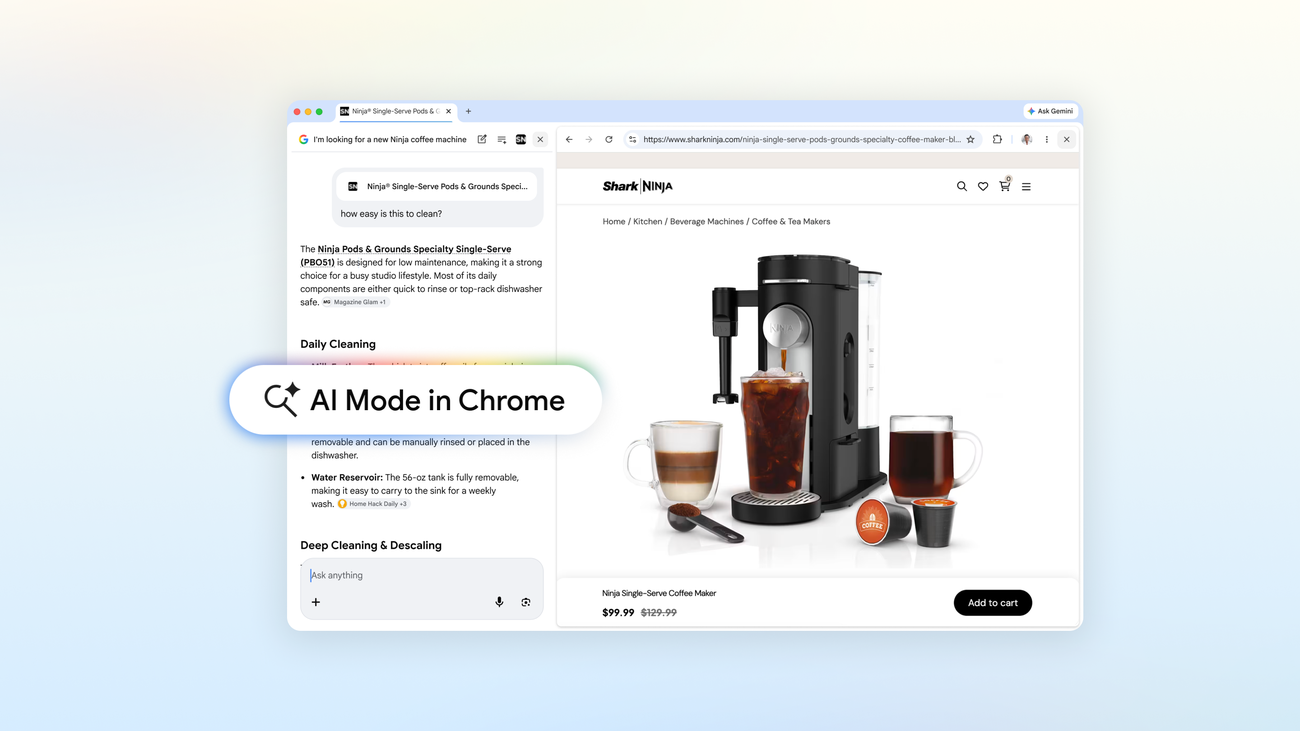
AI Mode in Chrome opens pages side by side with search
By Steven Van ·
A new plus menu lets Chrome desktop users combine open tabs, images and files like PDFs into one AI Mode query, live now in the U.S.
AI Mode in Chrome desktop now opens links side by side with the search panel, so clicking through to a page doesn't leave AI Mode or lose the thread of a search. Follow-up questions can reference the open page and the wider web at once.
- A new "plus" menu on the New Tab page and inside AI Mode lets you pull in recently opened tabs, images and files like PDFs as inputs to a single search.
- Multiple tabs and file types can be combined in one query, for example adding several open pages plus new criteria to get tailored results.
- Tools already in AI Mode, including Canvas and image creation, are now reachable from that same plus menu wherever it appears in Chrome.
The updates are live now in the U.S., with Google saying they'll expand to more places soon.
Google Chrome
Fast, secure web browser with built-in Gemini AI — browse, search, and automate tasks across all your devices.
View Google Chrome →