HydraFusion in VS Code and the GitHub Copilot app
By Steven Van ·
HydraFusion is open to Copilot Pro, Pro+, Business and Enterprise users, with admins on Business and Enterprise needing to enable preview features.
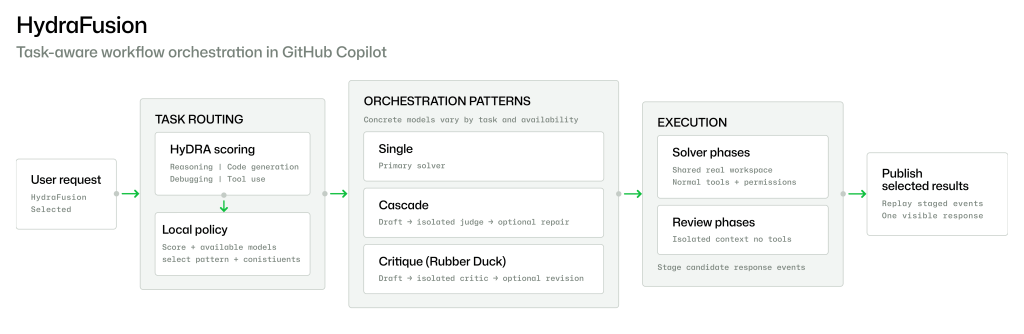
HydraFusion, the multi-model research preview in GitHub Copilot, is now available in Visual Studio Code and the GitHub Copilot app, after launching in Copilot CLI. It appears in the model picker like any other model, but it orchestrates several models and picks one of three workflows per request: Single, Cascade or Critique.
- Single: one selected model solves the task directly.
- Cascade: an efficient model drafts a solution, and a quality gate decides whether to accept it or escalate to a stronger model.
- Critique: one model drafts a result, an independent read-only critic from a different model family reviews it, and the drafting model revises once.
In VS Code (version 1.140 or later, or VS Code Insiders), select HydraFusion from the Copilot Chat model picker. If it does not appear, enable chat.copilot.hydraFusion.enabled. In the GitHub Copilot app, update to the latest version, search Settings for HydraFusion, turn it on, then pick it from the model picker.
This release adds more visibility into each step of a workflow and more frequent progress updates, so it is easier to tell that HydraFusion is still working on a long task. Bringing it to more surfaces was the top request from early feedback.
HydraFusion is available to Copilot Pro, Pro+, Business and Enterprise users. On Business and Enterprise, an administrator must enable preview features. It remains a research preview and is subject to change.