Figma Make gets a properties panel and canvas annotations
By Steven Van ·
Edit AI-generated prototypes with familiar visual controls or numbered callouts instead of typing every change, on all Make plans.
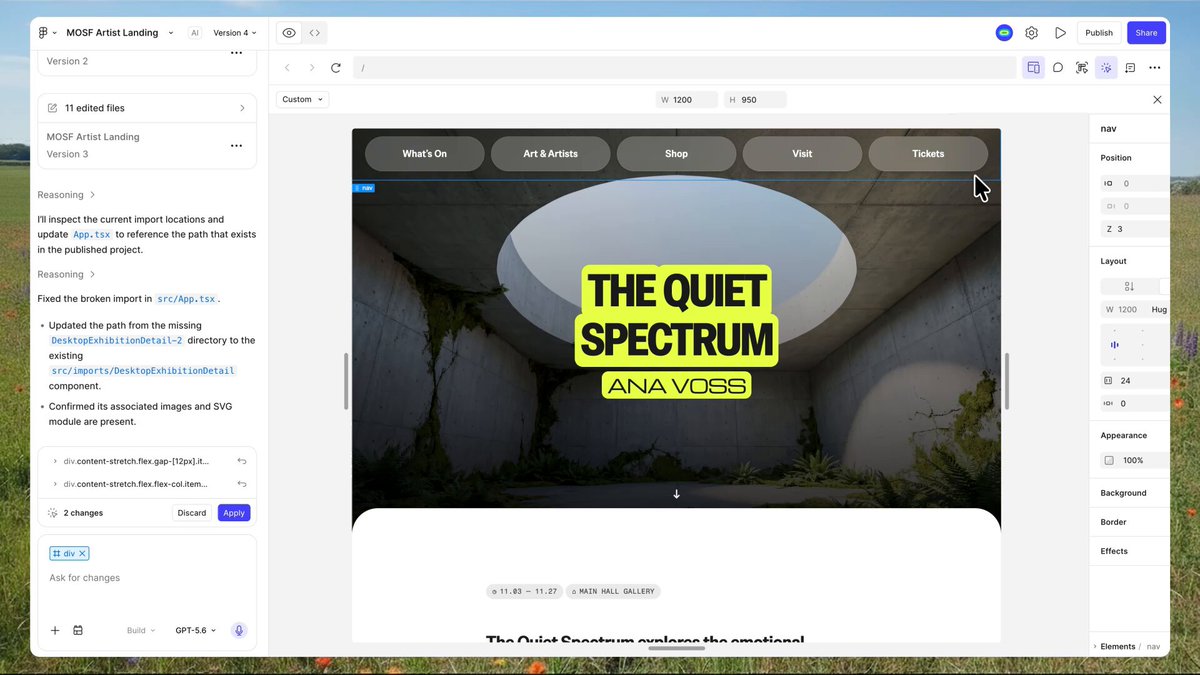
Figma Make added a properties panel and annotations, giving prompt-built designs a direct manipulation layer instead of requiring every change to go through text. The goal is bridging design and code more tightly: edit a Make-generated prototype the way you'd edit any Figma design, without describing the change in words first.
Familiar controls, now inside Make
The properties panel brings the visual controls Figma Design users already know, spacing, typography, layout, opacity, z-index, and border style, directly into the Make editor. Select Edit on an element and adjust it the same way you would in a standard Figma file, rather than typing 'increase the padding on this card' and waiting for the agent to interpret it.
Annotations for changes too complex for a slider
For edits that aren't a simple property tweak, selecting Annotate for agent lets you mark elements on the canvas with numbered callouts and describe what should change, things like 'fade this button in after a 300ms delay' or 'add a subtle press effect when tapped.' Both direct edits and annotations stage in the chat panel first, so you can review exactly what's about to change before the agent updates the underlying code.
Fewer credits, more precision
Figma notes that direct manipulation through the properties panel uses meaningfully fewer tokens than an equivalent text prompt, since clicking a specific element and adjusting a specific value is inherently more precise than describing intent in words. Both features are available on all seats and plans, though the properties panel currently only works with new Make designs.