Figma Make adds a properties panel and canvas annotations
By Steven Van ·
Both features work on all Make plans and use fewer credits than editing via text prompt, but the panel only applies to new designs.
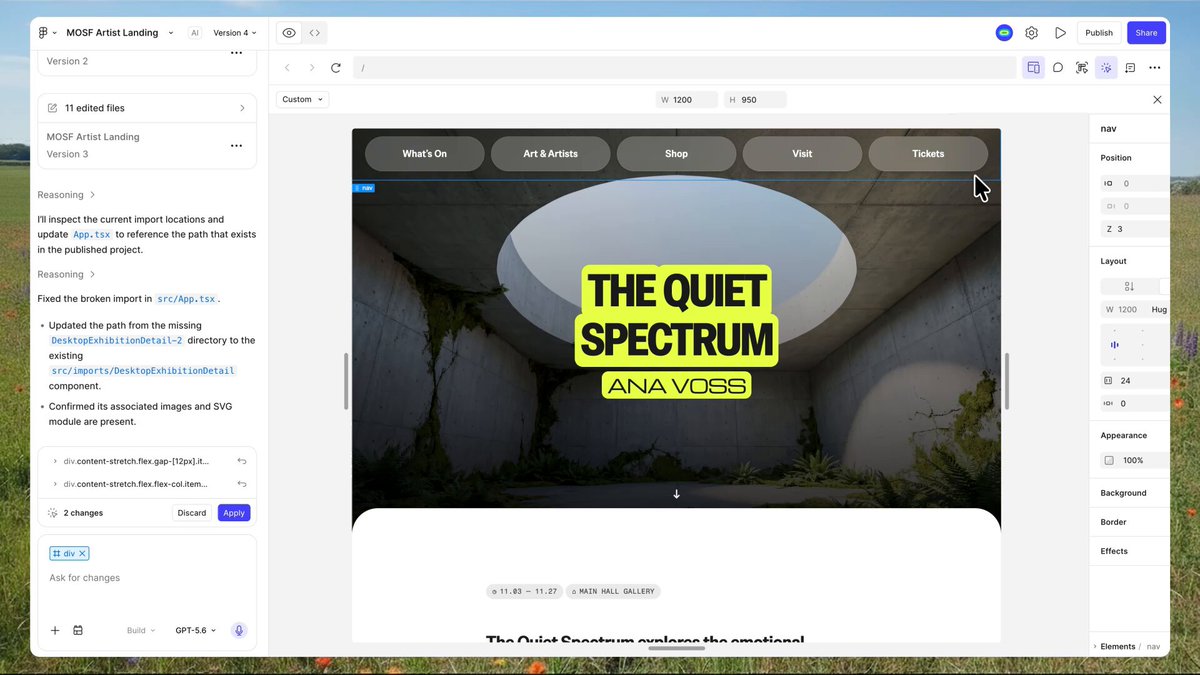
Figma Make now has a properties panel and annotations for editing designs and prototypes built in code, without writing a prompt for every change. Selecting "Edit" opens familiar Figma Design controls for spacing, typography, layout, opacity, z-index and border style, and edits can be applied to every instance of an element at once. For changes beyond visual properties, like adding a delay or a press effect, selecting "Annotate for agent" lets a creator mark elements on the canvas and describe the change directly, and the agent applies it across all selected elements.
Both features are rolling out now to Figma Make on all seats and plans, and use fewer credits than describing the same change in a text prompt. Edits stage in the chat panel for review before they're applied and consume credits. The properties panel only works with new Make designs; existing designs keep the old editing tool.
Read the full announcement.