A guided Payments tab for your app
By Steven Van ·
Base44's new Payments tab guides builders from connecting Base44 Payments or Stripe through a test checkout to their first live payment.
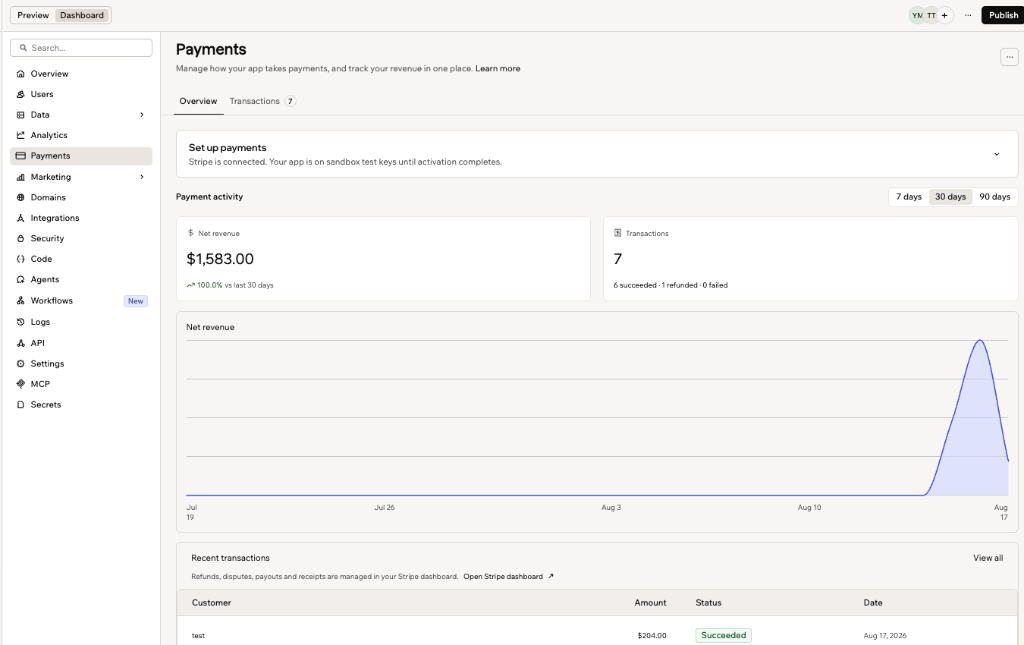
Base44 has added a guided Payments tab that walks builders through taking their app live with payments. The tab appears once an app is connected to a provider, either Base44 Payments (powered by Wix) or Stripe, and leads through finishing setup with that provider and running a test transaction before real payments start.
- Guided setup: a step-by-step flow from connecting a provider to the first real payment.
- Test checkout: run a test transaction to see the checkout customers will use.
- Transaction data in one place: view payments and revenue from the connected provider without opening an external dashboard.
Base44
AI app builder — describe what you want and get a fully functional web app in seconds, no coding required.
View Base44 →