Photoshop's Generative Fill previews Firefly Image 5
By Steven Van ·
The beta model edits via written instructions instead of scene prompts, and currently caps output at 4 megapixels.
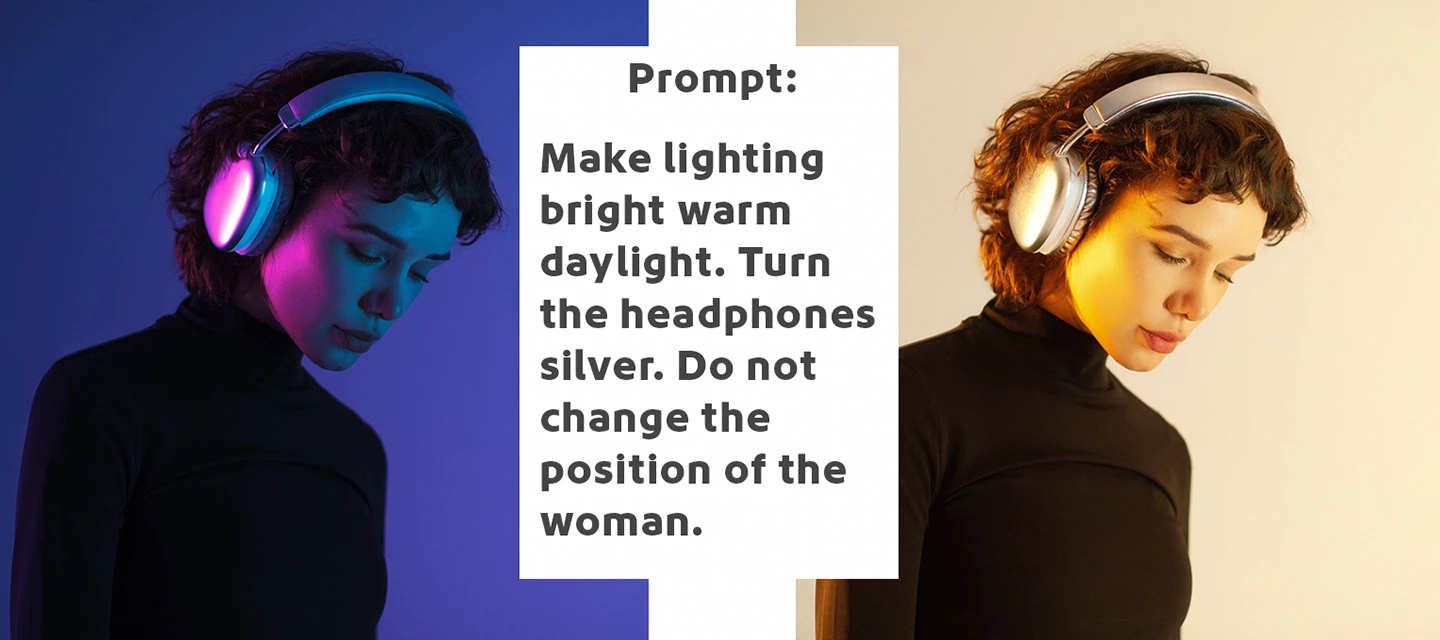
Photoshop's Generative Fill has a preview of Firefly Image 5, Adobe's newest image model, bringing an instruction-based editing workflow to Photoshop (Beta) on desktop. Instead of describing a scene to generate, you write a direct instruction, such as "change the time of day to sunset", and the model applies that edit while keeping the rest of the image's pixels and details unchanged.
To use it: select the entire canvas, open Generative Fill from the Contextual Task Bar, choose Firefly Image 5 (Preview) from the model picker, enter an instructional prompt, and generate. Smaller selections are supported but the beta performs best on a full-canvas selection, and it returns one variation at a time. Output is capped at 4 megapixels in any aspect ratio (for example 2048x2048 for 1:1, or 2304x1728 for 4:3).
Adobe notes that prompting for this model works differently from other Firefly models: use precise colour names, detailed descriptions and clear action verbs, explicitly state what should stay unchanged, quote exact text to replace, and specify camera angle or framing to avoid unwanted repositioning. Feedback can be left through the Beta Feedback panel or by rating results in the Properties panel.